
10 Innovative Strategies for Designing Flexible Hybrid Classrooms
Hybrid classrooms have rapidly transformed education, blending the best elements of in-person and online learning. As educators worldwide adapt to this new model, the need for flexible and adaptive classroom designs has never been greater. In this article, we explore 10 innovative strategies for designing flexible hybrid classrooms that foster student engagement, improve learning outcomes, and streamline the teaching process.Whether you’re a teacher, administrator, or edtech enthusiast, these strategies will help you build a modern and effective hybrid learning habitat.
Table of Contents
- Introduction
- Benefits of Flexible Hybrid Classrooms
- Top 10 Strategies for Flexible Hybrid Classroom Design
- practical Tips for Implementation
- Case Studies: Hybrid Classroom Success Stories
- Conclusion
Introduction: Embracing the Hybrid Classroom Revolution
The traditional classroom is evolving. today’s learners are seeking more flexible,personalized,and interactive experiences that go beyond the four walls of a school. Hybrid classrooms—where face-to-face instruction is seamlessly integrated with digital learning—are emerging as a powerful solution. By embracing innovative strategies for designing flexible hybrid classrooms, educators can engage students, adapt to diverse learning needs, and future-proof their teaching methods.
Benefits of Flexible Hybrid Classrooms
- Personalization: Tailor learning to individual student needs, abilities, and interests.
- Accessibility: Enable participation from anywhere, leveling the playing field for remote and in-person learners.
- Collaboration: Foster teamwork and communication through both physical and digital platforms.
- Resilience: Adapt easily to disruptions, such as health emergencies or inclement weather.
- Resource Optimization: Maximize the use of technology, classroom space, and teaching materials.
Top 10 Strategies for Designing Flexible hybrid Classrooms
1. Integrate Smart Classroom Technology
Leverage smartboards, interactive projectors, and classroom management systems to synchronize in-person and online instruction. Invest in high-quality cameras and microphones to ensure clear communication between all participants, enhancing the overall hybrid classroom experience.
2. Adopt a Modular Classroom Layout
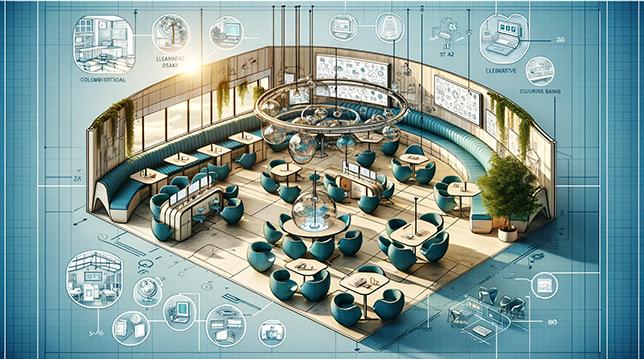
design classrooms with movable desks, chairs, and partitions to easily shift between collaborative group work and independent study. Flexible furniture encourages dynamic learning environments, supporting a variety of teaching methods and student preferences.
- Use foldable tables and stackable chairs.
- Install mobile presentation screens and charging stations.
3. Utilize Blended Learning Platforms
Employ powerful Learning management Systems (LMS) like Moodle, Google Classroom, or Canvas to unify assignments, resources, discussions, and assessments. These platforms bridge the gap between remote and classroom learners,fostering engagement and accountability.
4. Develop Asynchronous Learning Modules
Design asynchronous content such as pre-recorded lectures,interactive quizzes,and discussion forums. This strategy empowers students to learn at their own pace and revisit materials as needed—key for success in a flexible hybrid classroom setting.
5. Facilitate real-Time Interaction
Incorporate tools like Zoom, Microsoft Teams, or Webex to host live sessions where remote and in-person students can interact concurrently. Use live polling, Q&A, chat functions, and breakout rooms to create an engaging and inclusive classroom experience.
6. Prioritize Equity and Accessibility
Ensure that classroom materials and activities are accessible to all students, irrespective of learning modality. Utilize closed captioning,screen readers, and adjustable font sizes.Provide alternative assessments and offer technical support for students facing connectivity challenges.
7. Implement Flipped Classroom Models
Encourage students to engage with instructional content (videos, readings, podcasts) before class, and then use in-person or synchronous sessions for hands-on activities, discussions, and collaborative projects. This flipped hybrid classroom model maximizes interactive learning time.
8. Create Collaborative Learning Zones
design dedicated in-class and virtual spaces where students can work together on projects or peer learning activities. Use online whiteboards such as Miro or Jamboard, and set up physical stations with supplies for in-person small groups.
9. Foster a Dynamic Feedback Loop
Utilize regular formative assessments and diverse feedback channels—such as surveys, instant polls, peer reviews, and self-assessments—to gather actionable insights.Adjust hybrid classroom strategies in real-time to better meet student needs and learning objectives.
10. Offer Flexible Attendance and Participation Options
Allow students to participate in class synchronously (in-person or live online) or asynchronously (watch recordings, submit assignments later) based on their personal circumstances. This adaptability enhances engagement and reduces barriers to learning success.
Practical Tips for Successful Implementation
- Start small: Pilot one or two hybrid strategies before scaling up across all classes.
- Invest in professional progress: Train teachers and staff on new technologies and pedagogies.
- Communicate expectations: Set clear guidelines for participation, assessment, and collaboration for both in-person and remote students.
- Engage families: Involve parents and caregivers by sharing resources, updates, and strategies for supporting student learning at home.
- Collect feedback: Regularly survey students and colleagues to identify challenges and areas for enhancement.
Example: "after moving to a hybrid setup, our school used Google Classroom along with mobile whiteboards and flexible seating. Student engagement rose by 20% in the first semester!"
Case Studies: hybrid Classroom Success Stories
Case Study 1: Urban High School Adopts Hybrid Model
A Midwest urban high school reimagined its classrooms using a blend of technology (smartboards, classroom microphones) and modular furniture.By introducing asynchronous modules and real-time interactive sessions, student attendance rose by 15%, and there was a notable increase in collaborative project completion.
Case Study 2: University Implements Flexible Attendance
A large university transitioned its introductory courses to a flexible hybrid format, letting students choose between attending in person, joining via livestream, or watching recorded sessions. Satisfaction surveys reported that 89% of students appreciated the increased flexibility and improved work-life balance.
Teacher Viewpoint
“Flexibility empowered my students to participate more fully,” shares Ms. Rivera, a ninth-grade science teacher. “With breakout rooms and blended content, my hybrid classroom became an inclusive, interactive space rather than a logistical headache.”
Conclusion: Transforming Education for the Future
Designing flexible hybrid classrooms isn’t just a trend—it’s a necessary evolution in education. By implementing these 10 innovative strategies, educators can create student-centered learning environments that bridge the gap between physical and digital spaces. The future of education is flexible, inclusive, and dynamic—and it starts with the way we design our hybrid classrooms.
Ready to transform your hybrid classroom? Start by integrating just a few of these innovative strategies and watch your educational community thrive. For further inspiration,explore expert resources,connect with hybrid teaching communities,and keep experimenting with new tools and layouts.
If you found this article helpful, share your own experiences and strategies for designing flexible hybrid classrooms in the comments below! Stay tuned for more insights on creating engaging learning spaces for the 21st century.