
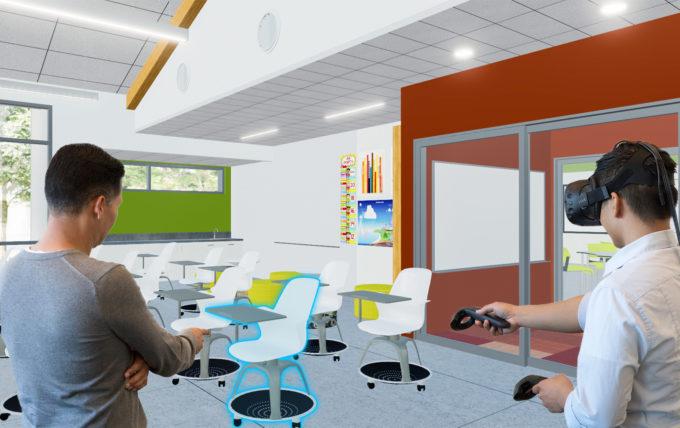
Affordable & Innovative VR Solutions for Schools: Cost-Effective Options for Modern Classrooms
Virtual Reality (VR) technology has taken the world of education by storm. Once restricted to high-budget organizations, VR is now more accessible and affordable than ever before. Schools across the globe are embracing cost-effective VR solutions to create dynamic, engaging learning environments that stimulate curiosity and foster innovation. if you’re a teacher, IT administrator, or school leader searching for budget-friendly and innovative VR solutions for your classroom, you’re in the right place.
Why Choose VR for Your Classroom?
VR is not just a buzzword; it’s a transformative tool with the power to:
- Enhance student engagement – Virtual reality immerses students in lessons, making learning more captivating and memorable.
- Bridge the gap between theory and practice – VR turns abstract concepts into tangible, interactive experiences.
- Foster inclusivity – Offer accessible learning for diverse needs, including visual and kinesthetic learners.
- Promote collaboration – Many VR platforms support interactive group activities and teamwork.
The Benefits of Affordable VR Solutions in Schools
Integrating virtual reality into modern classrooms brings a host of advantages, even with a limited budget:
- Expands learning horizons: Immerse students in virtual field trips, historical reenactments, or science labs — all from the classroom.
- Improves knowledge retention: Interactive lessons help students retain facts better than customary methods.
- Builds future-ready skills: Prepares students for technology-driven workplaces thru exposure to advanced digital tools.
- Boosts motivation and focus: VR minimizes distractions and increases student participation.
- Cultivates empathy: Walking in someone else’s shoes dramatically boosts emotional intelligence and understanding.
Affordable & Innovative VR Solutions for Schools
Budget constraints shouldn’t prevent your school from leveraging the power of VR. Here are cost-effective VR options for educational settings, ranging from simple smartphone-based setups to standalone all-in-one headsets:
1. Google Expeditions & Cardboard
- Hardware required: Inexpensive Google Cardboard viewers (as low as $10 each), plus student smartphones (or school-provided devices).
- Features: Offers a vast library of VR field trips and 360-degree experiences across science, history, geography, and more.
- Why it’s affordable: Uses existing devices, low-cost headsets, and free or low-cost apps. Perfect for schools just getting started with VR.
2. Oculus Quest 2 / Meta Quest 2
- Hardware required: Meta Quest 2 headset (starting around $299; frequently enough discounts available for bulk/education purchase).
- Features: All-in-one wireless headset; supports a wide range of educational apps and experiences, including VR chemistry labs, art studios, and virtual field trips.
- Why it’s affordable: No PC needed, durable construction, easy classroom management, and growing educational ecosystem.
3. ClassVR
- Hardware required: Dedicated, all-in-one VR headsets designed for education.
- Features: Includes teacher portal for classroom management, curriculum-aligned content, and lesson plans.
- Why it’s affordable: Offers bundled pricing for schools and comprehensive support, reducing setup and maintenance costs.
4. Merge VR Headsets
- Hardware required: Merge VR Headset (around $50) and compatible smartphones or tablets.
- Features: Durable, kid-friendly design. Supports both VR and AR apps, including 3D object viewing and virtual field trips.
- Why it’s affordable: Lower per-unit cost and compatibility with devices many schools already own.
5. Panoform and WebVR Tools
- Hardware required: Any Internet-connected device with a display; optional inexpensive viewer (like Google Cardboard).
- Features: students create their own VR worlds using tablets or computers. WebVR apps allow immersive experiences without dedicated hardware.
- Why it’s affordable: Uses free tools and leverages existing technology, promoting student creativity on a minimal budget.
Practical Tips for Implementing Cost-Effective VR in the Classroom
- Start small and scale: Begin with a pilot program, even if it’s just one headset and a handful of students per session.
- Use grants and discounts: Look for education grants, local technology funds, or vendor discounts for schools.
- promote device sharing: Schedule VR sessions so classes can share hardware, maximizing utility and minimizing costs.
- Leverage free content: Take advantage of free VR lesson plans,apps,and online resources developed for K-12 education.
- Get staff training: Invest in basic teacher training or use peer-led workshops to make implementation smooth and effective.
- prioritize safety and hygiene: Use disinfectant wipes and encourage hand-washing between VR sessions, especially for shared headsets.
Case Studies: Real Schools, Real Results
Case Study 1: elementary School Embraces Google Cardboard
At Greenfield elementary in Ohio, a fifth-grade class used Google Cardboard and student smartphones for “virtual field trips” to Ancient egypt. Teachers found students were more engaged and expressed better retention of social studies topics.The total cost for 30 viewers was under $350.
Case Study 2: Innovative High School Leverages Meta Quest 2
Central High School in California invested in a classroom set of 10 Meta Quest 2 headsets using a district innovation grant. Teachers rotated them among science, art, and history classes. Students collaborated in virtual art studios, explored molecular models, and experienced key historical moments—sparking cross-disciplinary learning.
Case Study 3: Middle School Finds Success With ClassVR
Using district technology funds, Maple Ridge middle school in Canada introduced ClassVR headsets to support immersive science and geography lessons. Teachers highlighted how easy it was to integrate curriculum-aligned VR into lesson plans using the ClassVR teacher portal.
First-Hand Teacher Experience
“Introducing VR in my classroom was a game-changer. With just a few Merge headsets and old smartphones,my students stepped inside the lungs during our biology lessons and walked on mars for science. They’re excited to learn, ask more questions, and even help each other troubleshoot the tech!”
— Mrs. Torres,7th Grade Science Teacher
Frequently Asked Questions (FAQs)
A: Yes,VR is generally safe with sensible time limits (usually 15-20 minutes per session) and proper supervision.
Q: Can VR be used for students with learning disabilities?
A: Absolutely! Many VR tools are designed to be inclusive and can help visual, auditory, and kinesthetic learners equally.
Q: How can teachers afford VR on tight budgets?
A: By choosing low-cost solutions, partnering with local businesses, applying for technology grants, and leveraging community donations, schools can introduce VR without major investments.
Conclusion: The Future of Learning is Here
Affordable and innovative VR solutions allow schools of every size and budget to bring immersive learning to their classrooms. With a little planning, creativity, and the right tools, students can experience the world—and even worlds beyond—without ever leaving their desks. As education evolves, embracing cost-effective VR options is a smart step toward equipping students with 21st-century skills and igniting a love for learning that lasts a lifetime.
Ready to get started with VR? Evaluate your budget, explore the solutions above, and take the first step toward transforming your modern classroom today.