
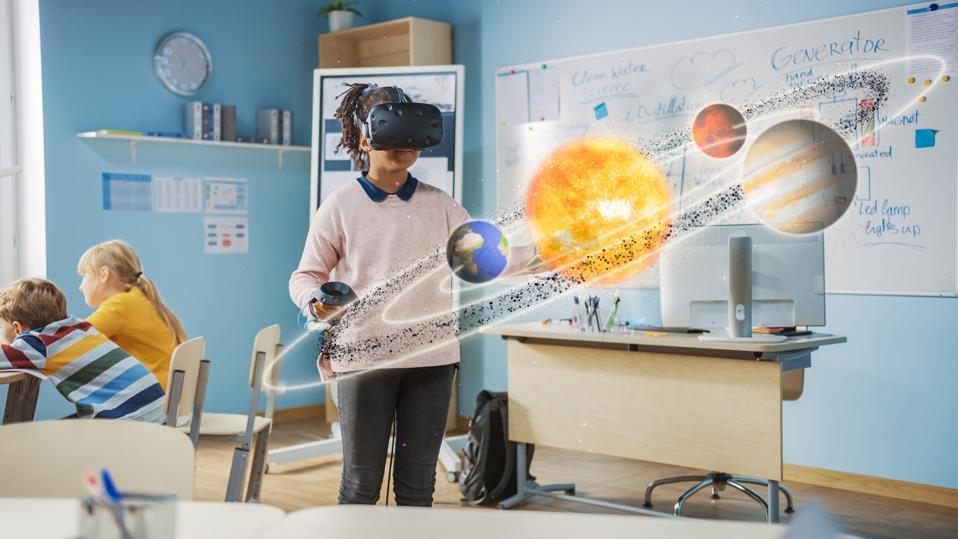
Affordable VR solutions for Schools: Budget-friendly Options for Powerful Classroom Learning
Virtual Reality (VR) is transforming classrooms across the globe, making subjects more immersive, interactive, and engaging. However, the misconception that VR technology is prohibitively expensive often holds schools back from adopting it. in reality, affordable VR solutions for schools are now widely available, empowering educators to bring powerful, hands-on learning experiences to students without breaking the budget. In this comprehensive guide, we’ll explore the best budget-friendly VR options for classrooms, their key benefits, tips for effective implementation, and inspiring case studies.
Benefits of VR in the classroom
- Enhances Engagement: VR captures students’ attention and makes learning more memorable.
- Visualizes Abstract Concepts: Students can explore complex topics, such as anatomy or space, in a visual and interactive way.
- Promotes Active Learning: Learners participate and explore rather then passively receive information.
- Bridges Distance and Accessibility Gaps: Virtual field trips make inaccessible places and experiences available to all students.
- Supports Diverse Learning Styles: VR appeals to visual, auditory, and kinesthetic learners alike.
Top Affordable VR Solutions for Schools
You don’t need a huge budget to bring VR into your school. Here are budget-friendly VR options and devices that deliver high-impact educational experiences:
1.Google Cardboard & Compatible Apps
- Price: As low as $10 per headset
- How it Works: uses inexpensive cardboard viewers paired with smartphones.
- Best For: Classrooms new to VR; large group activities.
- educational Apps: Google Expeditions, Titans of Space, Within, and many others.
- Pros: Extremely cost-effective,very portable,works with existing smartphones.
- Cons: Limited interactivity, basic graphics, depends on phone quality.
2. Meta Quest 2 (Previously Oculus quest 2)
- Price: Starting around $299 per headset
- How it Works: All-in-one wireless VR headset, does not require a PC.
- Best For: small groups, interactive science, history, and art lessons.
- Educational Apps: Wander (Virtual field trips),Anne Frank House VR,Mission: ISS,and more.
- Pros: Excellent graphics and interactivity, wide range of apps, easy setup.
- Cons: Higher initial investment; headsets may require sanitized sharing procedures.
3. ClassVR
- Price: Custom bundles; approximately $300 per headset (bulk discounts for schools)
- How it Works: Dedicated VR headsets with a classroom-focused management portal.
- Best For: Larger groups, full-class VR experiences.
- Educational Apps: Extensive curriculum-aligned library; multi-user VR scenarios.
- Pros: teacher controls, easy group management, robust safety and privacy options.
- Cons: Higher upfront costs; somewhat limited outside of the ClassVR suite.
4. MERGE VR headset
- Price: About $50 per headset
- How it effectively works: Durable foam headset works with most smartphones and includes hands-on AR options.
- Best For: Younger students, STEM explorations, AR activities.
- Educational Apps: MERGE EDU platform, Merge Object Viewer, Science simulations.
- Pros: Affordable, comfortable fit, suitable for younger users, AR and VR options.
- Cons: Limited graphics compared to premium headsets, requires smartphones.
5. Smartphone-based VR with Free Apps
- Price: Free (if students/teachers already own smartphones)
- How it Works: Students use personal devices with low-cost viewers like Google Cardboard.
- Best For: BYOD (Bring Your Own Device) programs; quick experiments with VR content.
- Educational Apps: Free VR apps like Google Arts & Culture.
- pros: Minimal cost, flexible usage, entry-level exposure.
- Cons: Performance and quality vary by device.
How to Integrate VR on a School Budget: practical Tips
Bringing VR to classrooms doesn’t have to mean overhauling your school’s technology program. Consider these practical tips for affordable VR integration:
- Start Small: Begin with a few headsets for small group work or as a learning station.
- Seek Grants & Community Support: Many organizations provide education technology grants for VR initiatives.
- Use Free Educational VR Content: Platforms like Google Expeditions and YouTube VR offer a wide range of free educational experiences.
- Cycle Devices Between Classes: share devices among classrooms and grade levels to maximize use and minimize cost.
- Host VR Days or Demonstrations: Allow all students access periodically rather than purchasing a headset for each student.
- Leverage BYOD Policies: Allow students to use their own smartphones to experience VR.
- Take Advantage of Bulk Discounts: Many VR device companies offer significant savings to schools purchasing multiple units.
Case Studies: Affordable VR Success in Schools
Greenwood Elementary, Ohio: Virtual Field Trips on a Budget
Greenwood Elementary implemented Google Cardboard headsets in their 4th-grade classrooms using donated and recycled smartphones. Teachers led students on virtual field trips to the Great Wall of China and the International Space Station using Google Expeditions.
Result: Students reported higher engagement in social studies, and standardized test scores improved in topics covered with VR.
Riverdale Middle School: STEM Learning with MERGE VR
Riverdale Middle School purchased 15 MERGE VR headsets and used the MERGE EDU app for interactive science labs. Students were able to dissect a virtual frog and explore the solar system—activities impractical in a traditional classroom setting.
Result: Lab costs decreased, and students demonstrated deeper content retention and enthusiasm for STEM subjects.
Bright Futures Charter School: Meta Quest 2 for Senior Projects
Bright Futures Charter School invested in four Meta Quest 2 headsets, rotating them among senior students for research projects in art history and biology. Using Wander and anne Frank House VR, students created immersive presentations.
Result: 90% of participating students said VR made learning more “real,” and teachers observed increased creativity and critical thinking.
First-Hand Experience: What Educators Say
We interviewed several teachers who implemented affordable VR in their classrooms.Here’s what thay shared:
Mrs. Patel,Science Teacher: “VR gave my students the chance to experience ecosystems from inside,not just through a textbook. Even my most reluctant learners became excited about science.”
Mr. Thomas, History Teacher: ”Virtual reality isn’t just engaging; it simplifies teaching about ancient civilizations and brings history to life in a way that no video can.”
Ms. Lin, Technology Coordinator: ”We started with just six devices and rotated them around – the impact on digital literacy and critical thinking has been amazing.”
Potential challenges and Solutions
While budget-friendly VR options are accessible,some common challenges include device maintenance,content selection,and student supervision. Here’s how schools can address these:
- Device Care: Use wipes and covers; create user guidelines.
- Supervision: Schedule group VR sessions with close adult supervision.
- Content Curation: Choose age-appropriate,curriculum-aligned apps and review them regularly.
- Training: Offer quick workshops for teachers on VR device management and lesson integration.
Conclusion: Making powerful Learning Affordable
Affordable VR solutions for schools are no longer a distant dream — they’re a practical reality. With options ranging from ultra-low-cost Google Cardboard headsets to powerful all-in-one VR devices like Meta Quest 2, educators are equipped to revolutionize learning on even tight budgets. The key to success lies in starting small, leveraging free content, sharing resources, and tapping into community support.
By implementing budget-friendly VR options in your classrooms, you can unlock immersive, engaging, and effective learning experiences that increase student motivation, improve retention, and build critical 21st-century skills.The future of education is virtual — and with today’s affordable VR technology,every school can be part of it.
Ready to start your VR journey? Connect with local educational technology advisors,explore grant opportunities,and try out free VR apps today. Your students will thank you!