
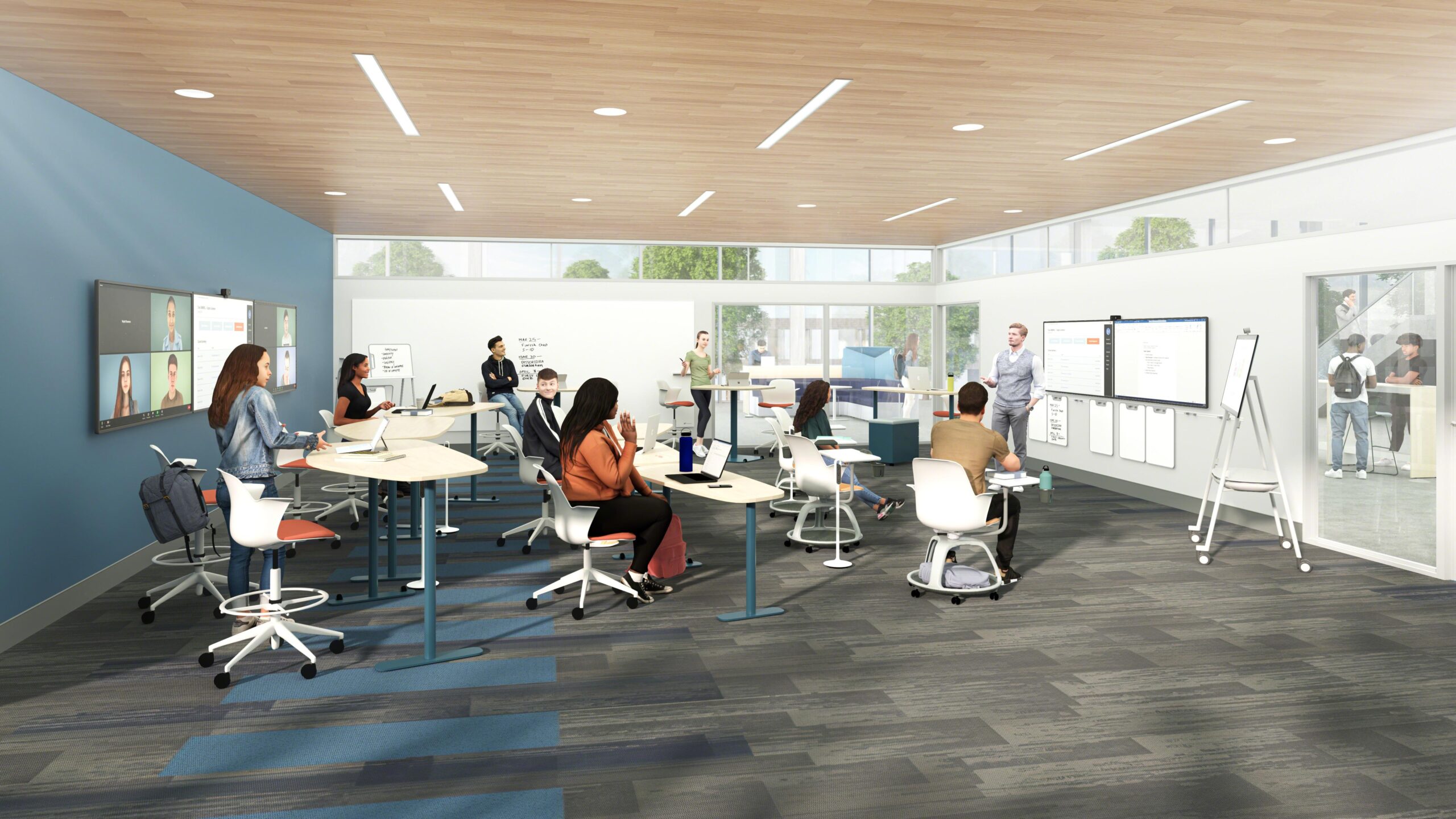
Designing Hybrid Classrooms for Flexibility: Strategies for Adaptive and Effective Learning Spaces
The rise of hybrid classrooms has revolutionized the face of education, seamlessly blending in-person and online learning. Whether you’re an educator, school administrator, or instructional designer, creating adaptive and effective learning spaces is crucial for fostering student engagement and achieving successful learning outcomes. In this extensive guide, we’ll explore the key principles, strategies, and actionable tips for designing hybrid classrooms for flexibility, ensuring your educational spaces are modern, resilient, and future-ready.
Why Flexible Hybrid Classrooms Matter
Hybrid learning, by its very nature, demands a high level of adaptability.Students and teachers often switch between physical and virtual environments, making it essential to design spaces and experiences that cater to both modalities. Here are the primary reasons why flexible hybrid classrooms are vital in today’s educational landscape:
- Enhanced Accessibility: Accommodates diverse learning preferences and needs, offering remote and on-site participation.
- Future-Proofing Education: Equips schools to handle disruptions—like pandemics or weather closures—without sacrificing learning quality.
- Improved Engagement: Supports various teaching styles and interactive activities, keeping students motivated and involved.
- Resource Optimization: Efficient use of space and technology maximizes budget and enhances learning outcomes.
core Principles of Adaptive Hybrid Classroom Design
To design a truly flexible and effective hybrid classroom, consider the following foundational principles:
- Inclusivity: Ensure equal access and participation for both in-person and remote students.
- Mobility: Use flexible furniture and modular layouts to quickly pivot between instructional formats.
- Connectivity: Reliable digital infrastructure—robust Wi-Fi, cloud-based platforms, and integrated AV equipment—is a must.
- Collaboration: Incorporate spaces and tools that encourage collaborative group work across physical and virtual boundaries.
- Student-Centric Design: Centre spaces and technologies around student needs, promoting agency and personalized learning.
Key Strategies for Designing Flexible Hybrid Classrooms
Ready to put theory into action? Here are proven strategies for creating effective, adaptable hybrid classroom environments:
1. Flexible Classroom Layouts
- Modular Furniture: Invest in lightweight, movable desks and chairs.These can be reconfigured for individual study,group work,or teacher-led instruction.
- Zoning spaces: Create distinct learning zones within the classroom—such as, a video conferencing zone, a hands-on “maker” space, and quiet alcoves for focus work.
2. Integrated Technology solutions
- High-Quality AV Systems: Equip classrooms with 4K cameras, omnidirectional microphones, and large digital displays to bridge the gap between in-person and remote learners.
- Interactive Whiteboards: Use digital boards that sync with companion devices for real-time collaboration.
- Seamless LMS Integration: Ensure your Learning Management System (LMS) is the central hub for assignments, resources, and interaction.
3. Dynamic Teaching Practices
- Flipped Classroom Approach: Deliver lectures or core content online prior to class, freeing up classroom time for active, hands-on learning.
- Synchronous & asynchronous Activities: Balance real-time (live) sessions with on-demand materials to accommodate all schedules.
- Regular Feedback Loops: Use formative assessment tools (e.g., polls, quizzes, breakout rooms) for immediate and inclusive feedback.
4. thoughtful Acoustics and Lighting
- Sound control: Acoustic panels and carpets can minimize noise,enhancing clarity for students and online participants.
- natural Lighting: Whenever possible, maximize daylight while controlling glare for screen visibility. Consider adjustable blinds or smart lighting systems.
Benefits of Adaptive Hybrid Learning Spaces
Implementing these strategies doesn’t just make learning spaces more versatile—they deliver tangible benefits to students, teachers, and institutions alike:
- More Personalized Instruction: Enables teachers to tailor content and activities for diverse student needs.
- Higher Student Satisfaction: Flexibility increases engagement and motivation across different learning styles.
- Increased Collaboration: Technology-enhanced spaces foster partnerships across physical and virtual classrooms.
- Greater Institutional Agility: Schools can pivot quickly in response to emerging challenges.
Real-World Case Study: A High School’s Hybrid Classroom Change
Case Study: Greenview High School’s Adaptive Learning Space Makeover
Greenview High School, faced with the need to accommodate both in-person and remote learners, undertook a comprehensive redesign of its classrooms. here’s how they succeeded:
- Adopted modular desks and chairs for fast reconfiguration, facilitating everything from partner work to socially distanced setups.
- Installed ceiling-mounted microphones and wide-angle cameras to ensure remote students saw and heard all class interactions.
- Provided Chromebooks for all students,integrating thier Google Classroom LMS for seamless coursework management.
- Designated “Zoom Zones” with soundproofing, allowing students and teachers to join virtual meetings without distractions.
- Reported increased engagement levels from both in-person and remote learners, as evidenced by surveys and participation metrics.
Practical tips for Designing Your Hybrid Classroom
- Conduct a needs Assessment: Survey students and faculty to understand technological literacy, access, and learning preferences.
- Prioritize Universal Design: Ensure accessibility for students with disabilities by incorporating ramps,adjustable desks,and software that supports screen readers.
- Create a Technology Plan: Plan for charging stations, extra cables, and backup devices to prevent tech interruptions.
- Test and Iterate: Pilot your hybrid classroom with a small group. Solicit feedback on layout,tech,and pedagogy—then make improvements.
- Train your Staff: Provide professional development on new tools and hybrid teaching strategies for ongoing success.
common Challenges and Solutions in Hybrid Space Design
-
Challenge: Tech Fatigue and Overload
Solution: Keep interfaces simple. Limit the number of platforms used and train everyone thoroughly.
-
Challenge: Unequal Participation
Solution: Use frequent check-ins and structured interactions to engage remote and in-person learners equally.
-
Challenge: Acoustic or Connectivity Issues
Solution: Invest in quality AV equipment and set up a tech support channel for troubleshooting.
-
Challenge: space Constraints
Solution: Utilize multipurpose furniture and reimagine underused areas (like corridors) as breakout spaces.
Conclusion: The Future of Hybrid Classrooms
As education continues to evolve, designing hybrid classrooms for flexibility is more than a trend—it’s a vital strategy for building resilient, inclusive, and effective learning environments. By embracing adaptive layouts, integrated technology, and innovative teaching practices, schools empower both teachers and students to thrive in any setting.
Investing in flexible hybrid learning spaces isn’t just about managing the present; it’s about future-proofing education. Start with a vision, leverage the strategies outlined here, and transform your classroom into a hub of innovation and endless possibilities.