
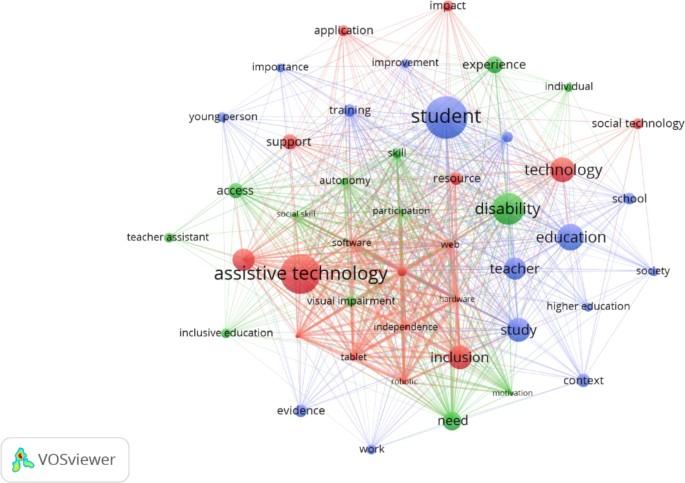
How Assistive Technologies Are Transforming learning Experiences in Modern Education
introduction: The Digital Revolution in Education
Modern education is experiencing a important transformation thanks to the rise of assistive technologies. Designed to support diverse learners, assistive technology tools are breaking barriers for students with disabilities and unique learning needs. These innovations are not only making education more accessible and inclusive but also boosting engagement, comprehension, and achievement for all students. In this article, we’ll explore how assistive technologies are reshaping educational experiences, highlighting their benefits, real-life implementations, and practical tips for educators and learners.
What is Assistive Technology in Education?
Assistive technology (AT) in education refers to any device, software, or equipment that helps students overcome barriers to learning. This encompasses a wide range of tools, from basic aids like large-print textbooks and pencil grips to cutting-edge digital platforms powered by artificial intelligence (AI).
- Low-tech tools: Braille books, audio books, visual timers
- mid-tech tools: FM listening systems, portable word processors
- High-tech tools: Text-to-speech software, voice recognition apps, adaptive learning platforms
At its core, assistive technology aims to provide equal learning opportunities and empower students to reach their full potential.
Key Types of Assistive Technologies Transforming Education
1. Text-to-Speech (TTS) and Speech-to-Text (STT)
text-to-speech tools allow students to listen to digital text, supporting learners with dyslexia, visual impairments, or reading difficulties. Speech-to-text tools, conversely, convert spoken words into written text, helping students with writing challenges or motor difficulties.
2. Augmentative and alternative Dialog (AAC) Devices
AAC devices, such as speech-generating tablets, empower non-verbal students to communicate effectively with their peers and teachers. These tools are vital for students with autism spectrum disorders, cerebral palsy, and other communication challenges.
3. Screen Readers and Magnification Tools
For visually impaired students, screen readers provide auditory feedback for digital content, while magnification software enlarges text and images. popular solutions include JAWS,NVDA,and ZoomText.
4.Learning Management Systems with Accessibility Features
Many modern LMS platforms now offer built-in accessibility tools—such as closed captioning, alternative text for images, and keyboard navigation—to support inclusive digital learning environments.
5. Adaptive Educational Software
Adaptive software personalizes instruction based on the learner’s strengths and areas for growth, providing targeted practice and real-time feedback. examples include Kurzweil 3000, Read&Write, and DreamBox Learning.
Benefits of Assistive Technology in the Classroom
- Enhanced Inclusion: Removes barriers for students with disabilities, enabling them to participate fully in general education settings.
- Personalized Learning: Adapts to individual needs, allowing students to learn at their own pace and style.
- Greater Independence: Fosters self-reliance by equipping learners with tools to complete tasks independently.
- improved Academic Performance: Supports comprehension, organization, and communication, leading to better outcomes.
- Boosts engagement and Motivation: Interactive and customizable technologies make learning more enjoyable and meaningful.
- Prepares Students for Future Success: Digital literacy and tech skills are critical in today’s workforce and society.
Case Studies: Assistive Technology in Action
Case Study 1: Using Speech-to-Text for Students with Dysgraphia
At a public middle school in California, a pilot programme introduced Google Docs voice typing to support students with dysgraphia. Within months, students previously struggling with written assignments demonstrated improved writing fluency and expressed ideas more clearly, while teachers reported greater participation in class.
Case Study 2: leveraging AAC Devices in Inclusive Classrooms
An elementary school in New York equipped non-verbal students with tablet-based AAC apps such as Proloquo2Go. The result? Enhanced communication, stronger social connections with peers, and increased academic engagement across subjects.
Case Study 3: Screen Readers Supporting College Accessibility
A major university improved campus-wide accessibility by providing all students with licensed screen reader software.Students with visual impairments reported faster access to course materials, seamless navigation of digital resources, and a boost in academic confidence.
First-Hand Experience: Educator Insights
“Integrating assistive technologies not only supports my students with special needs but also benefits every learner.Features like captions and audio support are used by nearly everyone in my classroom, making resources accessible and learning more efficient.” – Samantha Lee, Elementary Educator
“The difference is night and day when students have the right tools. I’ve seen reluctant readers blossom thanks to audio books and text-to-speech apps. They’re not just keeping up—they’re thriving.” – Mark Evans, High School English Teacher
Practical Tips for Implementing Assistive Technologies
- Conduct Needs Assessments: Collaborate with students, families, and specialists to identify learning barriers and select appropriate tools.
- Prioritize Training: Provide ongoing training for educators and students to ensure effective use and integration of technology.
- Start Small and Scale Up: Pilot new tools within small groups before expanding school-wide.
- Foster a Culture of Inclusion: promote openness and normalize the use of assistive devices for all students, reducing stigma.
- Evaluate and Adjust: Gather feedback frequently and make adjustments to better meet learners’ evolving needs.
- Stay Updated: Technology evolves rapidly; regularly review new solutions and best practices for integrating assistive technology in education.
Future Trends: The Evolving Landscape of Assistive Technology
Assistive technology is becoming increasingly smart and interconnected. Key trends shaping its future in education include:
- Artificial intelligence (AI) & Machine Learning: Enabling more precise personalization and real-time support.
- Wearable Technology: Devices such as smart glasses and haptic feedback tools offer new forms of sensory support.
- Cloud-Based Accessibility Tools: Foster seamless integration across devices and platforms, simplifying setup and maintenance.
- Global Design for Learning (UDL): Educational frameworks that embed accessibility and flexibility from the ground up.
These innovations promise even greater equity and empowerment for students of all abilities in the years to come.
Conclusion: Unlocking the Full Potential of Every Learner
Assistive technologies are opening doors for students who might or else struggle in conventional classroom settings. By harnessing the power of digital tools, educators and schools can create more accessible, inclusive, and effective learning experiences for everyone. Whether you’re teaching, supporting, or parenting a learner, exploring and embracing assistive technology can make all the difference—today and into the future.
Are you ready to join the transformation? Explore new assistive tech solutions, advocate for inclusive practices, and witness firsthand how technology can unlock the full potential of every student in the modern educational landscape.