
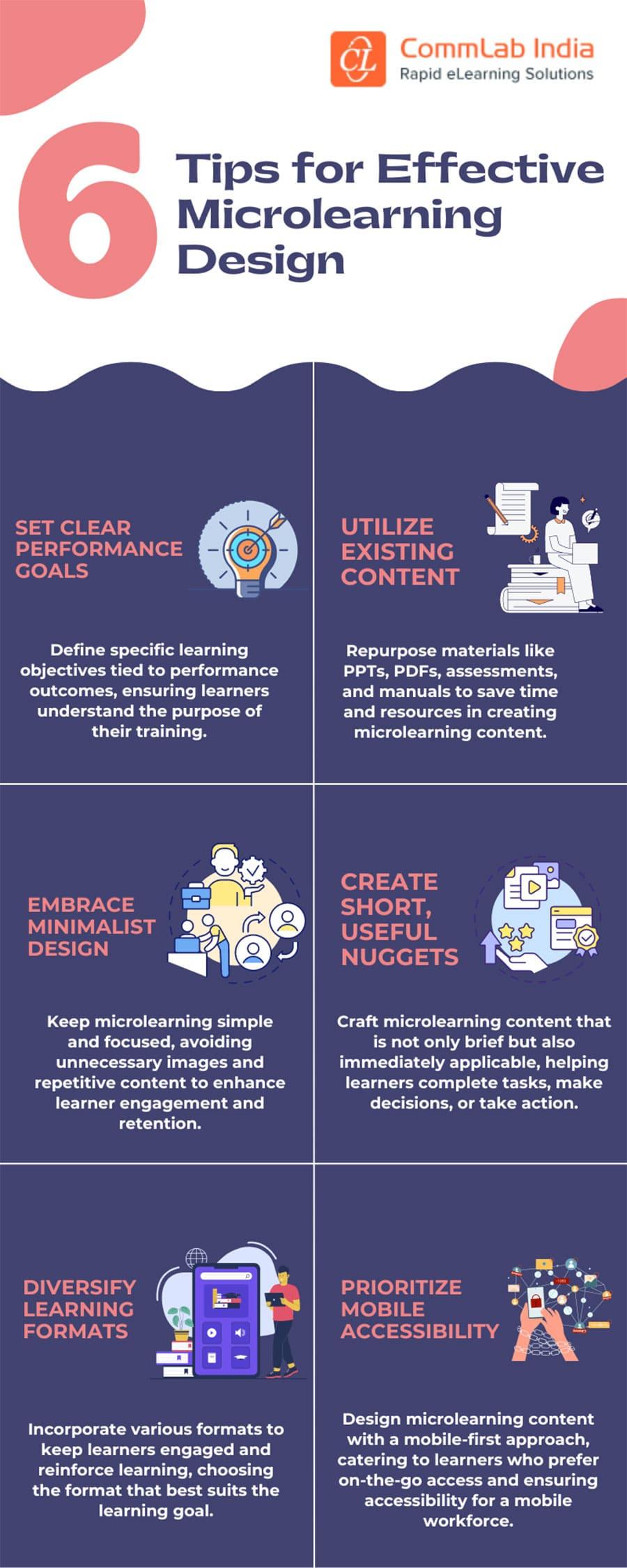
How to Design Effective Microlearning Modules: Best Practices for Engaging Learners
In today’s fast-paced digital landscape, microlearning is revolutionizing the way we deliver training and education. by breaking content into bite-sized, focused modules, organizations can boost learner engagement, enhance retention, and improve knowledge transfer. Whether you’re an instructional designer, L&D specialist, or educator, understanding how to design effective microlearning modules is critical to maximizing the impact of yoru online training initiatives.In this comprehensive guide, we’ll explore the best practices, benefits, real-world examples, and actionable tips for crafting microlearning experiences that truly resonate with learners.
What Is Microlearning?
Microlearning is an instructional strategy that delivers learning content in small, easily digestible segments. These brief and targeted lessons typically last between 2–10 minutes and focus on a specific learning objective. Unlike traditional training, microlearning is learner-centered, flexible, and often integrates multimedia elements such as video, quizzes, infographics, or gamified activities.
Benefits of Microlearning Modules
- Improved Knowledge Retention: Bite-sized lessons minimize cognitive overload and help learners retain information.
- Flexible Delivery: Microlearning modules can be accessed on-the-go, across devices, fitting seamlessly into busy schedules.
- Enhanced Engagement: Interactive content and regular feedback keep learners motivated and focused.
- Cost-Efficient: Short learning bursts are quicker and cheaper to produce and update than conventional courses.
- Personalized Learning: Learners can select modules relevant to their needs and progress at their own pace.
Best Practices for Designing Microlearning Modules
1. Define Clear Learning Objectives
Start by identifying the specific skills or knowledge you want your learners to achieve. Each microlearning module should focus on a single, measurable objective. This clarity helps in creating focused and impactful content.
2. Keep Content Focused and Concise
- Each module should address one concept or skill.
- Cut out any unnecessary information.
- Use simple language and clear instructions.
Remember: Lengthy explanations can defeat the purpose of microlearning. Stick to the essentials to maintain learner engagement.
3.Leverage Multimedia for Engagement
Incorporate varied media formats like short videos, audio snippets, interactive diagrams, podcasts, flashcards, and scenario-based storytelling. Multimedia boosts attention levels and appeals to different learning styles.
4. Promote Active Learning Through Interaction
- Add rapid quizzes, polls, and decision-making activities.
- Integrate drag-and-drop elements, simulations, and branching scenarios.
- Periodic feedback, even as simple as a “Well done!” message, reinforces learning.
5. Design for Mobile Learning
Microlearning modules are frequently enough consumed on smartphones or tablets. Optimize your designs for small screens by using responsive layouts, large tap targets, and readable font sizes.
6. Encourage Social and Collaborative Engagement
Integrate opportunities for learners to share insights or answer peers’ questions within the module. Use microforums, comment sections, or leaderboards to foster healthy competition and collaboration.
7. Use Real-Life Context and Scenarios
Situate each module in scenarios relevant to the learner’s work or life. Practical examples create a sense of relevance and help learners see immediate applications.
8. Enable Easy Progress Tracking and Micro-Assessments
- Provide visible progress bars and checkpoints within modules.
- Use brief formative assessments to reinforce key points and offer personalized feedback.
9. Apply Consistent and Appealing Visual Design
Use clear layouts, contrasting colors, and intuitively placed buttons for navigation. Consistency in design language across modules fosters familiarity and trust.
10. make Modules Standalone Yet Connectable
Each microlearning module should be “standalone”—learners must not need previous modules to understand it. Though, if part of a series, provide links or suggestions for other relevant modules (“You might also like…”).
Practical Tips for Enhancing Microlearning Effectiveness
- Chunk information: Break down complex topics into smaller chunks for step-by-step learning.
- Start with a Hook: Use a surprising fact, question, or scenario to spark curiosity right at the beginning.
- Optimize Time: Keep modules short—ideally under five minutes—to respect the learner’s attention span.
- Personalize Where Possible: Allow learners to pick modules relevant to their job roles or interests.
- Regularly Update: Keep content fresh and aligned with evolving business goals or market trends.
Case Study: Microlearning in Action
company: TechNova Software Solutions
Challenge: Reduce onboarding time and improve retention for remote hires.
solution: TechNova implemented a microlearning strategy using short, interactive lessons covering company policies, software tools, and communication protocols. modules featured video walkthroughs, quick polls, and scenario-based quizzes.
Results: Onboarding time dropped by 40%, and new hires reported higher confidence and satisfaction. HR also observed a significant boost in policy compliance.
First-Hand Experience: Lessons Learned as an Instructional Designer
Having designed microlearning modules for various organizations, I’ve found that learner feedback and iterative improvement are key. As an example, after launching a mobile-first sales training program, we discovered that modules with embedded short videos and real-world sales scenarios drove higher completion rates and interactions. Importantly,it’s essential to test modules across devices and keep the user experience as seamless as possible.
Frequently Asked Questions (FAQ)
- how long should a microlearning module be? Generally,keep it between 2 to 10 minutes. The ideal length depends on your audience’s needs and the complexity of the topic.
- Can microlearning replace traditional eLearning? Microlearning works best as a supplement or enhancement, focusing on discrete skills and just-in-time learning.
- What tools are best for creating microlearning modules? Popular options include Articulate Rise, Adobe Captivate, iSpring Suite, and WordPress LMS plugins (like LearnDash or LifterLMS).
Conclusion: Transform Learning Experiences with Effective Microlearning Modules
Microlearning modules empower organizations and educators to deliver highly engaging, relevant, and accessible instruction. By following the best practices outlined above—focusing on concise content, multimedia engagement, practical assessment, and continuous improvement—you can design microlearning experiences that keep learners motivated and maximize training ROI. Start small, measure impact, and iterate based on learner feedback. The future of learning is agile, interactive, and learner-centric, and microlearning is leading the way.
Ready to Craft Your Own Microlearning Modules?
Explore our microlearning design services and take your training strategy to the next level!