
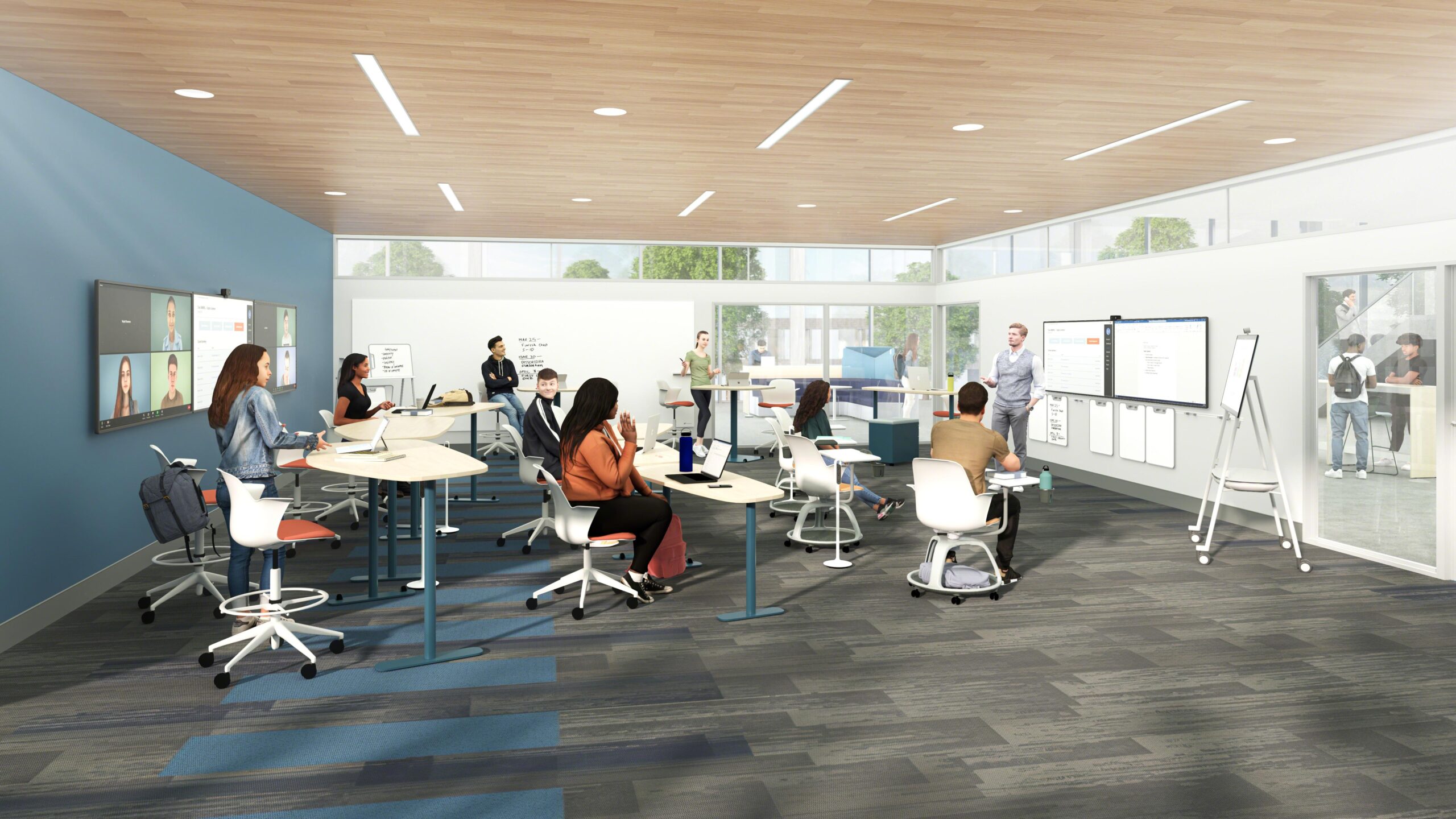
How to Design Flexible Hybrid Classrooms: Strategies for Modern learning Spaces
In the rapidly evolving educational landscape, designing flexible hybrid classrooms is more crucial than ever. Schools,colleges,and universities are increasingly adopting hybrid learning spaces to accommodate both in-person and remote students,enhance engagement,and ensure seamless continuity in education. But what makes a hybrid classroom effective, and how can educational institutions create adaptable, technology-rich environments? In this complete guide, we’ll explore the best strategies for designing flexible hybrid classrooms that meet the demands of modern learning.
- Why Hybrid Classrooms Matter in Modern Education
- Core Principles of Flexible Hybrid Classroom Design
- Key Strategies for Designing Hybrid Learning Spaces
- Benefits of Flexible Hybrid Classrooms
- Practical Tips for Setting Up Hybrid Classrooms
- Case Studies: flexible Classrooms in Action
- Conclusion: Embracing the Future of Learning Spaces
Why Hybrid Classrooms Matter in Modern Education
The pandemic acted as a catalyst, making hybrid learning environments mainstream. But beyond crisis response, the hybrid model supports varied learning preferences, maximizes accessibility, and fosters a more personalized educational experience. As student expectations shift, flexible hybrid classrooms empower educators and learners with tools and settings that transcend the customary classroom’s constraints.
Key Drivers Behind Flexible Hybrid Learning:
- Inclusivity: Supports students who learn remotely, have different needs, or require schedule flexibility.
- Adaptability: Enables swift transitions between fully-remote, fully-onsite, or blended learning modes.
- Technology Integration: Leverages modern tech to enhance engagement and collaboration.
- Student-Centered Approach: Encourages active, personalized, and collaborative learning.
Core Principles of Flexible Hybrid Classroom Design
Designing hybrid classrooms goes far beyond simply adding a webcam to a room.Effective hybrid classroom design is rooted in key principles that foster inclusiveness, flexibility, and engagement. Here’s what to keep in mind:
- Mobility: Use movable furniture and adaptive layouts to quickly reshape the space for group work, lectures, or remote participation.
- Tech-Enabled Spaces: Employ integrated AV solutions, reliable Wi-Fi, smartboards, and video conferencing tools.
- Flexible Zoning: Create distinct zones for small group interaction, solo work, and seamless teacher movement.
- Audio-Visual Optimization: ensure clear sound and visuals for every student,both in-person and online.
- Equity of Experience: Design the space so remote learners can interact and collaborate as effectively as those onsite.
Key Strategies for designing Hybrid learning Spaces
Now that we’ve covered the principles, let’s dive into actionable strategies for designing flexible hybrid classrooms:
1. Start with a Technology-First Mindset
- Invest in robust video conferencing systems (Zoom, Microsoft Teams, etc.) that facilitate real-time interaction between all students.
- Install high-quality microphones and speakers for superior audio clarity.
- Upgrade to interactive digital displays or smartboards for collaborative learning experiences.
- Ensure fast, reliable wireless connectivity throughout the space.
2. Flexible Furniture and Layouts
- Choose modular tables and pleasant, stackable chairs to quickly reconfigure the room as teaching needs change.
- Incorporate mobile whiteboards and dividers for spontaneous group work or privacy zones.
- Design “zones” where remote students are projected and can participate in group activities.
3. Engagement and Interaction Tools
- Use online collaboration platforms (Padlet, Google Workspace, Miro) to facilitate group work across physical and virtual boundaries.
- Adopt audience response systems (Kahoot!,Poll Everywhere) for formative assessments that engage all learners.
4. Acoustic and Visual Considerations
- Add acoustic panels or carpeting to absorb sound and reduce classroom noise, enhancing speech quality for remote attendees.
- Position cameras at eye-level to capture teaching activities and student reactions naturally.
- Ensure ample, adjustable lighting to support video quality and comfort.
5. Accessibility and Universal Design
- Offer captioning and transcription services for video content.
- Arrange pathways to be wide and free of obstacles for easy access.
- Make all technology intuitive and offer tech support or training for teachers and students.
Benefits of Flexible Hybrid Classrooms
Designing modern hybrid learning spaces yields important advantages for both students and educators:
- Increased Engagement: Interactive environments and technology tools keep remote and in-person learners equally involved.
- Scalability: Quickly adjust from small seminars to large-scale lectures without losing functionality.
- Inclusivity: Addresses a range of learning styles, physical needs, and geographical locations.
- future-Proofing: Spaces can adapt to evolving educational trends, technologies, and emergency scenarios.
- Personalized learning: facilitates self-paced, collaborative, or instructor-guided modes—all within the same environment.
Practical Tips for Setting Up Hybrid Classrooms
Whether you’re a school administrator, IT leader, or educator, consider thes practical steps for launching or upgrading your hybrid classroom:
- conduct a Needs Assessment: Evaluate the needs of your student population and teaching staff. Consider technology proficiency, physical space, and accessibility requirements.
- Pilot and Iterate: Start with a few flexible hybrid classrooms, gather feedback, and make improvements before scaling.
- Prioritize Teacher Training: Offer hands-on training for new technologies and hybrid teaching best practices to ensure teacher comfort and competence.
- regular Tech Audits: Check all technology (AV, Wi-Fi, platforms) weekly to resolve issues before they impact learning.
- Engage Students in the Design: Students can offer valuable insights into what helps them feel included and engaged, both in-person and online.
- Digital Resource Libraries: Build a repository of on-demand lectures, readings, and assignments, so all students have equal access, nonetheless of attendance mode.
Case Studies: Flexible Classrooms in Action
Case Study 1: Community College Embraces hybrid Flexibility
At Metro City Community College, a traditional lecture hall was transformed into a hybrid classroom. Movable desks, dual interactive displays, ceiling mics, and large projection screens allowed students to participate equally, whether at home or on campus. Faculty report a 35% increase in participation and a marked improvement in cross-group collaboration.
Case Study 2: Private High School Blends Outdoor and Tech Spaces
Greenwood Preparatory School created “flex-zones” with collapsible walls, extensive natural lighting, and outdoor Wi-Fi-enabled patios. Students seamlessly shift from indoor hybrid lessons to outdoor group work, deepening engagement and supporting wellness—while retaining robust tech access for all.
Experience: Teacher’s Perspective
“After moving to a flexible hybrid classroom, student interaction shifted dramatically,” says Ms. Linda Choi, a high school science teacher. “Even remote learners could led group experiments via live video and shared digital boards. It’s not just about technology, but how we use the space to include everyone.”
Conclusion: Embracing the Future of Learning Spaces
The shift toward flexible hybrid classrooms is reshaping what it means to teach and learn in the 21st century. By investing in adaptable designs,prioritizing technology,and supporting both educators and students,schools and universities can future-proof their learning environments. The result? Greater engagement, more inclusive participation, and learning spaces ready for whatever comes next.
Ready to design your own flexible hybrid classroom? Start with these strategies, listen to your community, and embrace the opportunities of modern learning. The future of education is hybrid—make your classroom ready to lead the way.
Interested in more tips about educational space design and hybrid learning? Subscribe to our newsletter for the latest resources,trends,and expert guides!