
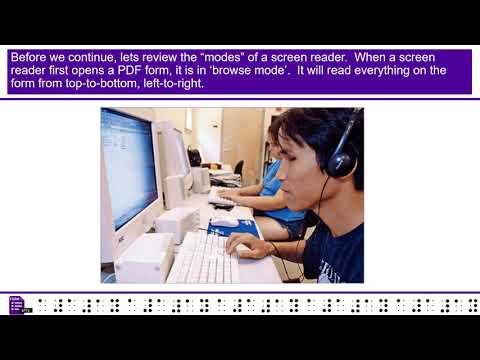
How to Ensure Digital Accessibility in Educational Tools: A Complete Guide
Digital accessibility in educational tools is essential for creating inclusive learning environments. As online education continues to expand, it’s crucial that all learners—including those with disabilities—can access and benefit from educational technologies. This comprehensive guide explores how educators, instructional designers, and edtech developers can ensure digital accessibility in educational tools, enhancing learning for everyone.
What is Digital Accessibility in Education?
Digital accessibility means designing educational platforms, content, and resources so everyone, including students with disabilities, can access, interact with, and benefit from them. This involves adhering to recognized standards, such as the Web Content Accessibility Guidelines (WCAG), and considering the full spectrum of learners, such as those with visual, auditory, cognitive, or physical impairments.
Why Does Accessibility matter in Educational Tools?
- Legal Compliance: Laws such as the Americans with Disabilities Act (ADA) and Section 508 require online educational content to be accessible to all students.
- Inclusivity: Everyone deserves equal access to educational opportunities, regardless of their abilities.
- Enhanced Learning Outcomes: Accessible tools improve user experience for everyone, leading to better retention and engagement.
- Wider Audience Reach: Accessibility expands your potential user base to include all learners.
Key Principles of digital Accessibility for Educational tools
To ensure digital accessibility, educational tools should follow the POUR principles from the WCAG:
- Perceivable: Facts must be presented in ways that users can perceive, regardless of their sensory abilities.
- Operable: users must be able to interact with interface components using various input methods (keyboard, voice, touch, etc.).
- Understandable: Information and interface operation must be clear and comprehensible.
- Robust: Content must work reliably with current and future assistive technologies.
Best Practices for Making Educational Tools Accessible
By integrating the following best practices, you can create educational resources that are usable by everyone:
1. Use semantic HTML and ARIA landmarks
- Structure your content using proper heading tags (
- Utilize ARIA (Accessible Rich Internet Applications) landmarks for dynamic content and navigation.
2. Ensure Keyboard Accessibility
- All interactive elements should be accessible using only the keyboard (Tab, Enter, Arrow keys).
- Provide visible focus indicators for links, buttons, and forms.
3. Provide Alternative Text for Images and Media
- Describe images and graphics with descriptive
alttext. - Add captions or transcripts to videos and audio content.
4. Use High Contrast and Readable Fonts
- Choose color combinations that offer strong contrast (e.g., dark text on a light background).
- Use web-safe, sans-serif fonts and avoid small text sizes.
5. Design Flexible Navigation
- Offer simple, linear navigation paths.
- Provide skip navigation links so users can bypass repetitive elements.
6. Ensure Forms Are Accessible
- Label every form input clearly.
- Group related fields and provide error messages that are easy to understand.
7. Test Accessibility Early & Often
- Utilize accessibility evaluation tools such as WAVE,Axe, or browser extensions to identify issues.
- Perform manual testing with screen readers (e.g., NVDA, JAWS) and keyboard navigation.
Benefits of Digital Accessibility in Educational Tools
Ensuring digital accessibility delivers numerous advantages, including:
- Legal Security: Minimizes the risk of lawsuits and regulatory non-compliance.
- Positive Reputation: Demonstrates social obligation and commitment to inclusivity.
- Increased User Engagement: Supports diverse learning styles and needs, which boosts participation.
- Improved SEO: Accessible websites typically rank higher in search engine results, thanks to better structure and content clarity.
Practical Tips for Implementing Digital Accessibility
- Develop a Clear Accessibility Policy
- Outline your institution’s commitment to accessibility.
- Assign roles and accountability within your team.
- Provide Training and Resources
- Educate content creators and developers on accessibility requirements and best practices.
- Share guides and checklists for accessible content creation.
- Involve Users with Disabilities
- Conduct usability testing with a diverse group of learners, including those who use assistive technologies.
- Prioritize Accessibility in Procurement
- Choose learning management systems (LMS), plugins, and third-party tools that prioritize accessibility compliance.
- Iterate Continually
- Digital accessibility is an ongoing process. Regularly review and update your tools according to feedback and evolving standards.
Case study: Enhancing Accessibility in an Online Learning Platform
Consider ABC University, which undertook a project to improve the digital accessibility of its main e-learning portal. The key steps included:
- Running automated accessibility audits using WAVE and manual verification with screen readers.
- Implementing keyboard navigation for all interactive components.
- Creating video content with properly synced captions and downloadable transcripts.
- Training staff and faculty in accessible content creation.
Within six months, ABC University observed a notable decrease in technical support requests and a meaningful increase in student participation, notably among those using assistive technology.
First-Hand Experience: Designing for Accessibility
As an instructional designer, focusing on accessibility transforms the learning experience for all students. By consulting directly with learners who use screen readers and magnification tools, I discovered that small changes—like consistent headings, descriptive link text, and logical tab orders—can make a world of difference.Integrating feedback loops with diverse students ensures your educational tools evolve to meet real needs.
Conclusion: Championing Inclusive Education Through Digital Accessibility
Ensuring digital accessibility in educational tools isn’t just a legal obligation—it’s an ethical imperative that benefits everyone. By following accessibility best practices, utilizing modern standards, and listening to users with diverse needs, educators and product creators can build e-learning platforms where every student has the tools they need to succeed.
Start making your educational content inclusive today. Together,we can break down the digital barriers and foster a more equitable learning environment for all!