
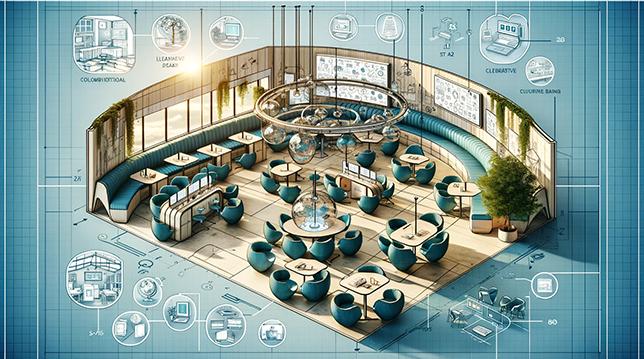
Hybrid Classroom design: How to Create Flexible, Future-Ready learning Spaces
Hybrid classroom design is rapidly transforming the educational landscape, redefining how students learn and teachers teach. As schools and universities navigate the future of education, creating flexible, future-ready learning spaces is crucial for accommodating in-person and remote learners alike. In this comprehensive guide, we’ll explore the key principles, practical strategies, and proven benefits of hybrid classroom design, helping educators and administrators build learning environments that inspire engagement, collaboration, and academic success.
why Hybrid Classroom Design Matters
With the rise of online learning and evolving expectations post-pandemic, customary classrooms are no longer sufficient. Today’s learners require seamless integration between physical and digital environments. Hybrid learning spaces bridge this gap, offering students the versatility to attend classes on-site or virtually, while providing teachers the tools to engage and manage both groups effectively.
- Inclusivity: Supports diverse learning styles and preferences
- Flexibility: Adapts to changing health guidelines and attendance needs
- Future-Proofing: Prepares schools for evolving educational demands
Key Elements of Effective Hybrid Classroom Design
Creating a successful hybrid classroom requires thoughtful planning and investment. Here are the essential components to consider:
1.Furniture and Space Planning
Flexible furniture is at the heart of hybrid classroom design. Modular desks, mobile chairs, and adjustable tables facilitate varied layouts for individual work, group projects, or virtual collaborations. Ensure that physical and digital interaction zones are optimized for comfort, visibility, and accessibility.
- Arrange seating to encourage both face-to-face and remote engagement
- Provide movable whiteboards or collaboration walls
- Ensure ADA compliance and ergonomic support
2. Technology integration
Robust technology is essential for connecting in-person and online learners. Invest in high-quality cameras, microphones, and interactive displays. Reliable Wi-Fi coverage, cloud-based learning platforms, and digital collaboration tools (like Google Classroom, Microsoft Teams, or Zoom) are non-negotiable.
- Install pan-tilt-zoom cameras to capture every angle
- Use ceiling mics and speakers for clear audio transmission
- Opt for interactive smartboards for dynamic presentations
- Facilitate device charging stations and cable management
3. Lighting and Acoustics
Classroom lighting shoudl support both camera work and student comfort. Incorporate daylight where possible,alongside adjustable LED fixtures to minimize glare. Acoustics must support clear sound both in-room and online, utilizing soft materials, sound panels, and strategic speaker placement.
- Install blackout blinds to control natural light during presentations
- Use acoustical ceiling tiles to reduce echo
- Optimize audio systems for speech clarity
4. Zoning and Accessibility
Design your hybrid classroom in zones for different activities—lecture areas, quiet study corners, virtual participation zones, and collaborative spaces. Accessibility for all learners is vital; ensure that students with special needs and remote participants have equitable access to resources.
- Clearly demarcate quiet and collaborative zones
- Provide wheelchair-friendly pathways
- Ensure technology supports screen readers and closed captioning
Benefits of Hybrid classroom Design
Adopting a hybrid classroom approach brings multiple advantages for students, educators, and educational institutions:
- Expanded Access: Allows students to participate nonetheless of location or circumstance
- enhanced Collaboration: Fosters group work and discussion across modalities
- Resilient Learning: Protects educational continuity during disruptions
- Personalized Teaching: Enables differentiated instruction and learning paths
- Efficient Use of Resources: Optimizes space and technology investments
Practical Tips for Creating Future-Ready Hybrid Classrooms
Ready to redesign your classroom for hybrid learning success? Here are some best practices and actionable steps:
- Consult Stakeholders: Involve teachers, IT specialists, students, and parents in the design process to gather insights and ensure buy-in.
- Embrace Flexibility: Choose modular furniture and mobile technology that can be reconfigured as class sizes and instructional needs evolve.
- Test and Iterate: Pilot new layouts and technology; solicit feedback from users to identify pain points and improvements.
- Prioritize Training: Provide ongoing professional development so educators are comfortable using new tech tools and teaching strategies.
- focus on Equity: Guarantee all students, including remote learners and those with disabilities, enjoy full participation through accessible design and robust tech support.
- Document Procedures: Create clear guidelines for hybrid instruction, technology troubleshooting, and classroom management.
Case Studies: Schools Leading the Way in Hybrid Classroom Design
university of Central Florida
The University of Central Florida has been a pioneer in hybrid learning spaces. Their “active Learning classrooms” feature flexible layouts, digital collaboration surfaces, and immersive audio-visual systems. faculty report increased student engagement, better attendance, and higher learning outcomes since adopting the hybrid model.
K-12 Innovators: westside Elementary, Texas
Westside Elementary invested in full hybrid classroom upgrades, including student webcams, high-quality speakers, and rolling desks. Teachers use blended activities, like live polls and breakout rooms, to connect remote and in-person learners. The result: Improved class participation and streamlined transitions during sudden pivots to virtual instruction.
First-Hand Experience: Educator Insights
“Redesigning my classroom for hybrid learning felt overwhelming at first,but the flexibility it allowed was transformative. I can reach students at home and in the classroom with equal impact. Real-time feedback and collaboration tools have made lessons more interactive and inclusive than ever before.”
— Sarah T., Middle School Science Teacher
“Investing in classroom technology paid off immediately. Attendance increased and students became more self-directed. The ability to break into smaller groups with both online and in-person students enriched the learning experience.”
— David L., University Instructor
Challenges and Solutions in Hybrid Classroom Design
transitioning to a hybrid model poses challenges, including technology glitches, increased teacher workload, and the need to balance synchronous and asynchronous activities. Schools can mitigate these issues with strategic planning:
- Robust IT Support: Employ dedicated personnel for troubleshooting and tech setup
- Professional Development: Offer workshops on hybrid pedagogy and classroom management
- Clear Dialog: Establish transparent policies for attendance, participation, and grading
- Gradual Rollout: Implement changes in phases to reduce overwhelm
conclusion: Building Future-Ready hybrid Learning Spaces
Hybrid classroom design is not just a trend—it’s a strategic imperative for modern education. By investing in flexible furniture, advanced technology, and inclusive layouts, schools empower their students and teachers to thrive in any context. As learning continues to evolve, future-ready classrooms will stand at the forefront, driving innovation, equity, and engagement for all.
Whether you’re planning a small-scale upgrade or a district-wide change,consider these core principles and actionable steps. The investment in hybrid learning spaces will pay lasting dividends, creating dynamic environments where every learner can succeed.
Ready to Transform Your Hybrid Classrooms?
Contact us to learn more about the latest solutions in flexible classroom design and technology integration for hybrid learning environments.