
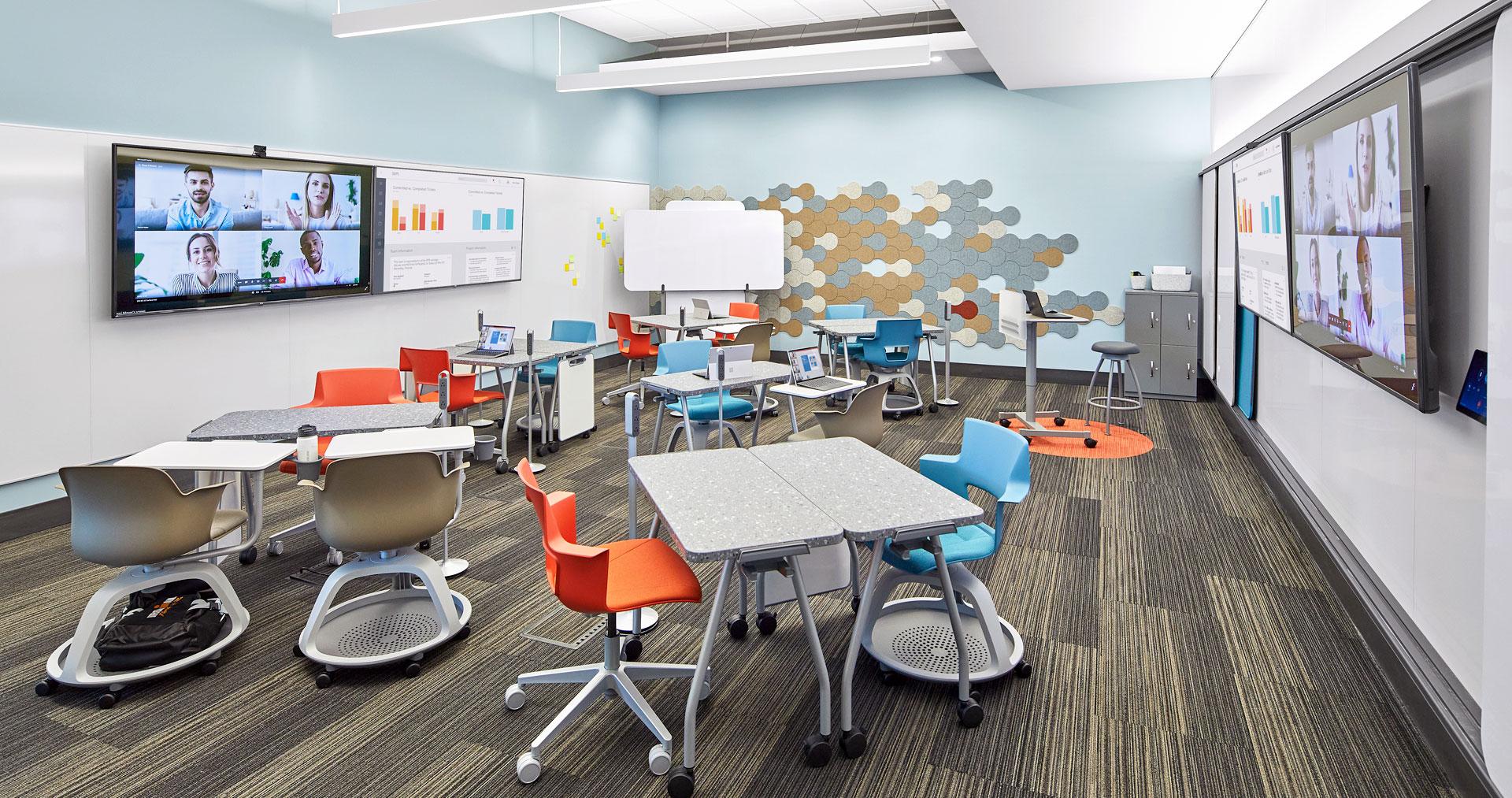
Hybrid Classroom design: Strategies for Flexible and Adaptive Learning Spaces
As education rapidly evolves, the hybrid classroom model is emerging as the gold standard for modern learning. With an increasing need for versatility, hybrid classrooms blend physical and digital spaces, accommodating both in-person and remote learners. A thoughtfully designed hybrid classroom not only bridges the gap between online and in-person instruction but also creates a responsive, inclusive, and engaging habitat for students. In this article,we’ll explore key strategies for hybrid classroom design and provide actionable tips for creating adaptive and flexible learning spaces that drive student success.
What is a Hybrid classroom?
A hybrid classroom, sometimes called a blended learning environment, merges traditional face-to-face teaching with digital tools and remote participation. This setup allows educators to reach students regardless of their location and provides learners with multiple modes of engagement. The foundation of effective hybrid classroom design lies in adaptability,ensuring that technology,furniture,and instructional practices can be customized to suit diverse learning needs.
Benefits of hybrid Classroom Design
- Flexibility: Adapts to varied teaching and learning styles, supporting both synchronous and asynchronous instruction.
- Inclusivity: Provides equitable access for all students, including those who can’t be physically present.
- Resilience: Ensures academic continuity during disruptions, such as pandemics or severe weather.
- Enhanced Engagement: Leverages digital tools and interactive technologies to sustain student interest.
- Optimized use of Space: Accommodates fluctuating class sizes and multi-purpose uses of educational facilities.
Key Strategies for Designing Flexible and Adaptive Hybrid Classrooms
1. Invest in Robust Technology Infrastructure
- Audio-Visual Systems: High-quality microphones, cameras, and displays are essential for connecting remote and in-person learners seamlessly.
- Reliable wi-Fi: ensure strong, consistent internet connectivity throughout the classroom to support devices and interactive applications.
- Interactive Displays: Smart boards and tablet screens foster collaboration and real-time content sharing.
2. Flexible Furniture and Layouts
- Mobile Furniture: Use lightweight chairs,tables,and whiteboards that can be easily reconfigured for group work,presentations,or independent study.
- Zoning: Designate areas for small group collaboration, individual study, and remote participation to minimize distractions and enable easy movement.
- Accessible Layouts: Create spaces that accommodate mobility devices, ensuring all learners can comfortably interact.
3.Integration of Collaborative Digital Tools
- Learning Management Systems (LMS): Platforms like Moodle, Canvas, or Google Classroom streamline assignment tracking and resource sharing.
- Video Conferencing Software: Zoom, Microsoft Teams, and similar tools facilitate live lessons, breakout sessions, and remote participation.
- Real-time Polls and Quizzes: Tools such as Mentimeter and Kahoot! maintain engagement during lessons.
4. Environmental factors
- Lighting: Utilize natural light were possible, supplemented by adjustable LEAD lighting to reduce eye strain for both on-site and remote learners.
- Sound Management: Install sound-absorbing panels to reduce echo and background noise, creating a pleasant acoustic environment for video and audio interactions.
- Ventilation: Ensure adequate airflow for comfort and health.
Best Practices for Hybrid Classroom Management
- Clear Interaction: Set expectations, participation guidelines, and learning goals at the outset.
- Consistent Schedules: Establish a routine that incorporates both synchronous and asynchronous learning opportunities.
- Training and Support: Invest in professional advancement for teachers and provide troubleshooting support for students using digital tools.
- Feedback Loops: Collect regular feedback from students on what works and what doesn’t, and adapt accordingly.
- Hybrid-Friendly Assessment: Design assessments that can be administered and submitted both in-person and online to accommodate all students.
Case Studies: Real-World Examples of Hybrid Classroom Design
University Implementation
at a major university in California,lecture halls were transformed for hybrid learning by adding swiveling 360-degree cameras,multiple microphones,and tiered seating zones for both solo and group participants. Remote learners could join live lectures via Zoom, interact using polling software, and even participate in peer discussions through virtual breakout rooms.
K-12 Success Story
A K-12 school in Texas implemented a hybrid model by reconfiguring classrooms with rolling desks, wall-mounted interactive displays, and portable device charging stations.Teachers incorporated Google Classroom for assignment management and used document cameras to share physical textbooks with remote students in real time.
First-Hand Experience: Teachers’ Outlook on Hybrid Classroom Design
“Transitioning to a hybrid classroom wasn’t easy, but investing time in planning and experimenting with furniture layouts, lighting, and tech tools made all the difference. My students, whether in class or online, now collaborate seamlessly, and engagement is higher than ever.”
— Amanda L., High School Science Teacher
Teachers highlight that their most effective hybrid spaces are those where flexibility is the norm.Ability to quickly shift from lecture to group work, and to engage both in-person and online students with the same lesson materials, are the most valued aspects.
Practical Tips for Schools and Educators
- Audit Existing Spaces: Identify underutilized spaces that can be transformed into hybrid classrooms.
- Pilot Programs: Start with a single classroom to test configurations and technology before a full-scale rollout.
- Student Involvement: Gather student input on furniture, tech, and layout preferences during the planning phase.
- regular Updates: Stay current with EdTech trends and continuously upgrade hardware and software as needed.
- Cross-Functional Collaboration: Work with IT, facilities, and teaching staff to ensure all aspects of the design are optimized for learning and technical efficiency.
Conclusion
The hybrid classroom design isn’t just a fad—it’s the future of education. By emphasizing flexibility, accessibility, and the integration of technology, schools and educators can build adaptive learning spaces that empower all students. As the education landscape continues to change, those who invest in flexible and adaptive hybrid classrooms will be best positioned to foster meaningful, inclusive, and dynamic learning experiences. Whether you’re revamping an existing space or building a new facility, the right strategies and tools can make hybrid classroom success a reality.