
Hybrid Classrooms: Essential Design Strategies for Flexible and Engaging Learning
In the evolving landscape of modern education, hybrid classrooms have swiftly emerged as a transformative approach, seamlessly blending conventional face-to-face instruction with dynamic online learning.As educators and administrators continue to adapt, designing effective hybrid learning environments becomes crucial for ensuring flexibility, student engagement, and education continuity. In this extensive guide, we explore essential design strategies for hybrid classrooms, highlighting key benefits, practical tips, real-world case studies, and expert insights to help you create impactful and flexible learning experiences.
what is a Hybrid Classroom?
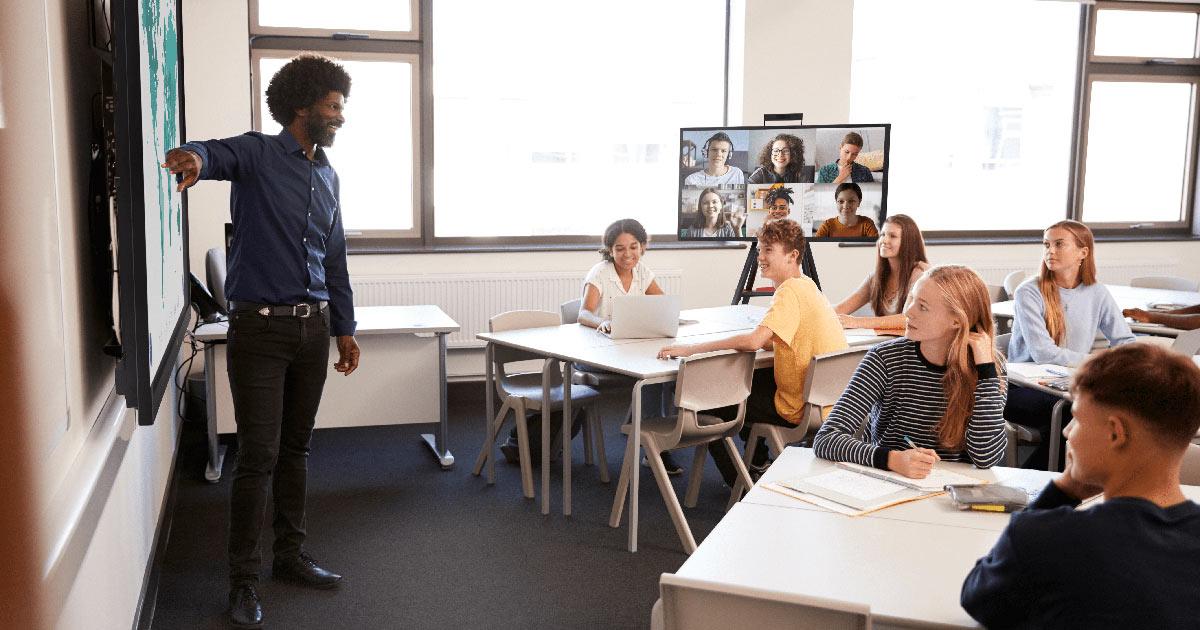
A hybrid classroom is an instructional model that integrates both in-person and online learning activities.Students may participate simultaneously in a physical space and remotely via online platforms,allowing for maximum flexibility and personalized learning. this approach not only extends educational access but also accommodates varying student needs and schedules.
Key Features of Hybrid Classrooms
- Simultaneous Delivery: instruction is accessible in-person and remotely, frequently enough in real-time.
- Technology Integration: leveraging digital tools—such as learning management systems (LMS), video conferencing, and collaborative apps.
- Interactive Engagement: Enables student participation across multiple formats: live, asynchronous, and self-paced.
- Personalized Pathways: Supports differentiated instruction to meet diverse learning needs.
Benefits of Hybrid Classroom Design
Hybrid classroom design isn’t just about convenience; it offers substantial benefits for both educators and students. Here’s why hybrid environments are gaining traction:
- Increased Flexibility: Students can attend classes in-person or online, reducing barriers related to distance or health concerns.
- Improved Accessibility: Hybrid models are inclusive, supporting students with diverse learning needs and preferences.
- Enhanced Engagement: Interactive technologies and multimedia content keep students motivated and involved.
- Greater Learning Continuity: Hybrid classrooms ensure education continues seamlessly during disruptions such as illnesses or campus closures.
- Personalization: Teachers can tailor learning activities and resources, maximizing individual student outcomes.
Essential Design Strategies for Engaging Hybrid Classrooms
To unlock the full potential of hybrid classrooms, educators must carefully architect physical spaces, digital platforms, and instructional methods. Below are proven strategies that foster flexible and engaging learning:
1. Invest in Reliable Technology Infrastructure
- High-Quality Audio and Video: Equip classrooms with clear microphones, HD cameras, and appropriate lighting to ensure remote learners feel included.
- Stable Internet Connection: Reliable, high-speed internet is a non-negotiable for seamless hybrid sessions.
- Accessible Hardware: Provide loaner devices or encourage BYOD (Bring Your Own Device) policies to bridge the digital divide.
2. Redesign Physical Spaces for Hybrid Learning
- Flexible Seating and Layout: Arrange desks or seating pods to encourage collaboration and easy movement between activities.
- Interactive Displays: Install projectors or smartboards visible to all, both in-person and virtually.
- Camera Placement: Ensure cameras can capture instructors, student participants, and classroom whiteboards equally.
3. Select the Right Digital Platforms and Tools
- Learning Management System (LMS): Centralize resources, assignments, and assessments (e.g., Canvas, Google Classroom, Moodle).
- Video Conferencing Software: Use reliable platforms such as Zoom, Microsoft Teams, or Google Meet for live sessions.
- collaborative Tools: Integrate apps like Padlet, Jamboard, and Kahoot! for shared activities and instant feedback.
4. foster a Sense of Community and Belonging
- Icebreakers and Small-Group Activities: Regularly mix in-person and online learners for discussions and projects.
- Open Channels of Dialog: Use online forums,chat features,and office hours to ensure all learners stay connected with instructors and peers.
- Inclusive Participation: Explicitly invite remote students to ask questions and contribute during live sessions.
5. Design for Engagement and Active Learning
- Blended Content Delivery: Alternate between real-time lectures, recorded materials, and hands-on tasks to cater to different learning styles.
- Interactive Polls and Quizzes: Use digital polling tools (Mentimeter, Poll Everywhere) to check understanding in both populations.
- Project-Based and Collaborative Learning: Assign group projects that require both face-to-face and asynchronous collaboration.
6. Prioritize Accessibility and equity
- Captioning and Transcripts: Offer captions during live sessions and transcripts for recordings.
- Accessible Materials: Upload documents in multiple formats and use readable fonts and color contrasts.
- Technical Support: Provide guides and real-time help for students struggling with digital tools.
Practical Tips for Prosperous Hybrid Teaching
- Set Clear Expectations: Establish participation norms, assignment deadlines, and communication channels for both learning modes.
- Pre-Record Lectures: Create high-quality videos for core content that students can revisit anytime.
- Plan for Flexibility: Design lessons that can be quickly adapted for virtual-only or in-person-only scenarios.
- collect Feedback: Regularly solicit input from students to refine your hybrid approach.
- professional Progress: Invest in ongoing training for faculty and staff on hybrid teaching best practices.
Case Studies: Hybrid Classrooms in Action
case Study 1: University Model
The University of Central Florida (UCF) is a renowned pioneer in hybrid education, offering numerous “blended learning” courses. By combining thoughtfully redesigned classroom spaces, a robust learning management system, and ongoing faculty support, UCF reported higher student satisfaction and learning outcomes.
- Faculty engaged in regular workshops to master digital tools and blended pedagogies.
- Students appreciated the ability to review recorded content and received targeted support as needed.
Case Study 2: K-12 School district Implementation
In Chicago Public Schools, a districtwide hybrid rollout included equipping classrooms with interactive displays, equipping teachers with lapel microphones, and providing every student with a tablet. Ongoing tech support and clear communication allowed for a smooth transition and improved academic continuity during disruptions.
First-Hand Experience: Teacher Insights
“My biggest takeaway from teaching in a hybrid classroom is the importance of clarity. Making sure every student—irrespective of where they join from—knows what’s expected helps foster trust and participation. Using interactive tools,like online whiteboards and breakout rooms,really bridges the in-person and virtual divide.”—Jessica Lee, 9th Grade Science Teacher
Conclusion: Embrace the Future of Flexible Learning
Hybrid classrooms are here to stay, redefining the way we approach teaching and learning in the 21st century. By embracing essential design strategies, investing in the right technology, and fostering an inclusive, engaging culture, educators can create flexible learning environments that support the success of all students. Whether you’re a K-12 educator or a university administrator, now is the perfect time to rethink and redesign learning spaces that are truly future-ready.
For the latest trends,tools,and research on hybrid classroom design,bookmark this page and join our community of forward-thinking educators!