
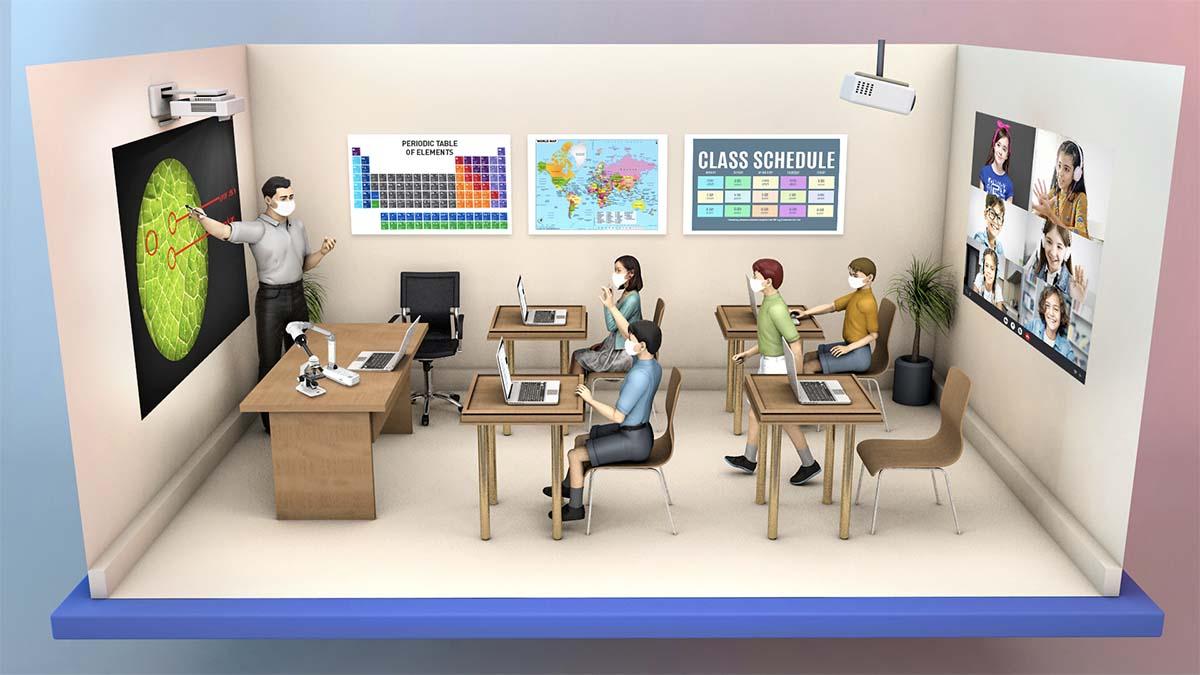
Hybrid Classrooms: Essential Design Strategies for Flexible Learning Environments
In today’s rapidly evolving educational landscape, hybrid classrooms are reshaping the way teachers deliver instruction and students engage with content. By seamlessly blending in-person and online learning, hybrid learning environments offer unparalleled versatility and accessibility, meeting the diverse needs of modern learners. As schools and institutions embrace this dynamic model, understanding essential design strategies for flexible hybrid classrooms has become crucial for success. This guide dives into effective approaches, real-world benefits, and practical tips to create adaptive learning spaces that thrive in both physical and virtual settings.
What Are Hybrid Classrooms?
Hybrid classrooms are innovative educational spaces where teaching occurs concurrently for both onsite and remote students. Leveraging technology and interactive design, they enable educators to conduct lessons that cater to physically present learners and those participating online in real time.Unlike traditional or fully virtual models, hybrid classrooms blend face-to-face collaboration with remote interactivity, providing a flexible learning environment optimized for all participants.
- Physical presence: Some students attend classes on campus.
- Remote participation: Others join synchronously from different locations.
- Technology integration: Audio-visual systems and learning management platforms bridge the gap between both cohorts.
Benefits of Hybrid Learning Environments
the shift toward hybrid classrooms is driven by their ability to enhance engagement, accessibility, and instructional flexibility. Here are some noteworthy advantages of well-designed flexible classroom environments:
- Increased accessibility: Students can attend regardless of their location, overcoming geographical or health barriers.
- Personalized learning: Hybrid formats support differentiated instruction, catering to individual learning paces and preferences.
- Collaboration opportunities: Digital tools foster teamwork between in-person and online students.
- Continuity during disruptions: Hybrid setups ensure learning continues seamlessly during unexpected closures or crises.
- Technology skills development: exposure to digital tools prepares students for future academic and professional environments.
Essential Design Strategies for Hybrid Classrooms
Building hybrid learning environments that are both functional and inclusive requires intentional planning. Here are the top design strategies to ensure your hybrid classroom supports dynamic and flexible learning:
1. Prioritize seamless Technology Integration
- High-quality audio-visual systems: Install microphones, cameras, and smart projectors to ensure clear communication and visibility for all students.
- Collaboration platforms: Use a robust Learning Management system (LMS) that supports file sharing,discussions,assessments,and live video integration.
- reliable internet connectivity: Ensure strong bandwidth for both in-person streaming and remote participation.
2. Flexible Physical Layout
- Modular furniture: Use tables and seating that can be easily rearranged to promote group work or individual study.
- Clear sightlines: Arrange the room so in-person students and remote cameras can always see the instructor and each other.
- Accessible power and device charging: Make sure electrical outlets are readily available to support device use.
3. Inclusive pedagogy
- Active learning strategies: Incorporate activities that engage both onsite and offsite participants, such as polls or breakout sessions.
- Universal Design for Learning (UDL): Offer materials in multiple formats and allow different ways to participate, ensuring accessibility for all learners.
- Ongoing feedback: Establish clear ways for all students to ask questions and interact in real time.
4.Environmental Considerations
- Proper lighting: Balance natural and artificial lighting for optimal visibility without creating online glare.
- minimize distractions: Use sound-absorbing materials and keep backgrounds uncluttered, especially in camera views.
5. Professional Development
- Ongoing training: Equip educators with the latest best practices in hybrid pedagogy and technology use.
- Peer support: Encourage collaboration and knowledge sharing among teachers adapting to hybrid models.
Practical Tips for Implementing a Flexible hybrid Classroom
- Test technology before each class: Ensure all devices, microphones, and platforms are functional to prevent disruptions.
- Assign student roles: In hybrid group work,designate a facilitator or tech liaison to ensure remote students are included.
- Utilize digital whiteboards: Engage all students with collaborative tools such as interactive screens or apps.
- Record sessions: Archive lessons for students who miss class or need review, supporting diverse learning needs.
- Solicit regular feedback: Ask students about their experiences and adapt strategies for continuous improvement.
Real-World Case Studies: Hybrid Classroom Success
Several educational institutions have successfully embraced hybrid learning environments using innovative design strategies:
- University of Central Florida: Developed “blendflex” classrooms equipped with 360-degree cameras and advanced microphones, allowing remote learners to feel immersed and connected to on-campus peers.
- K-12 District in California: Implemented flexible seating and mobile screens in hybrid classrooms, fostering greater autonomy and engagement across multiple grade levels.
- Community College in Texas: Used interactive polling software and cloud-based lesson materials to promote equity between in-person and remote learners.
First-Hand Experience: Voices from Hybrid Classrooms
“Implementing a hybrid learning environment transformed how our students interact. Remote learners share ideas on digital boards while in-class students discuss in real time. It’s a collaborative, flexible space that’s made everyone feel included,”
– Sarah P., High School Math Teacher
“Flexible seating and easily accessible technology made it so much easier to engage with lectures from home or on campus. I never felt left out, no matter where I was learning.”
– Jeremy R., College Student
Conclusion
As educational institutions strive to stay nimble and inclusive, hybrid classrooms stand out as a compelling model for the future of learning. By implementing essential design strategies—from integrated technology and flexible furniture to inclusive pedagogy and ongoing feedback—schools and educators can cultivate flexible classroom environments that empower every student. Whether you’re building new hybrid spaces or upgrading traditional classrooms, these strategies offer a strong foundation for academic success in an ever-changing world.
Ready to design your own flexible hybrid learning environment? Start with these principles,listen to your learners,and keep adapting—your classrooms will become beacons of innovation,inclusivity,and educational excellence.