
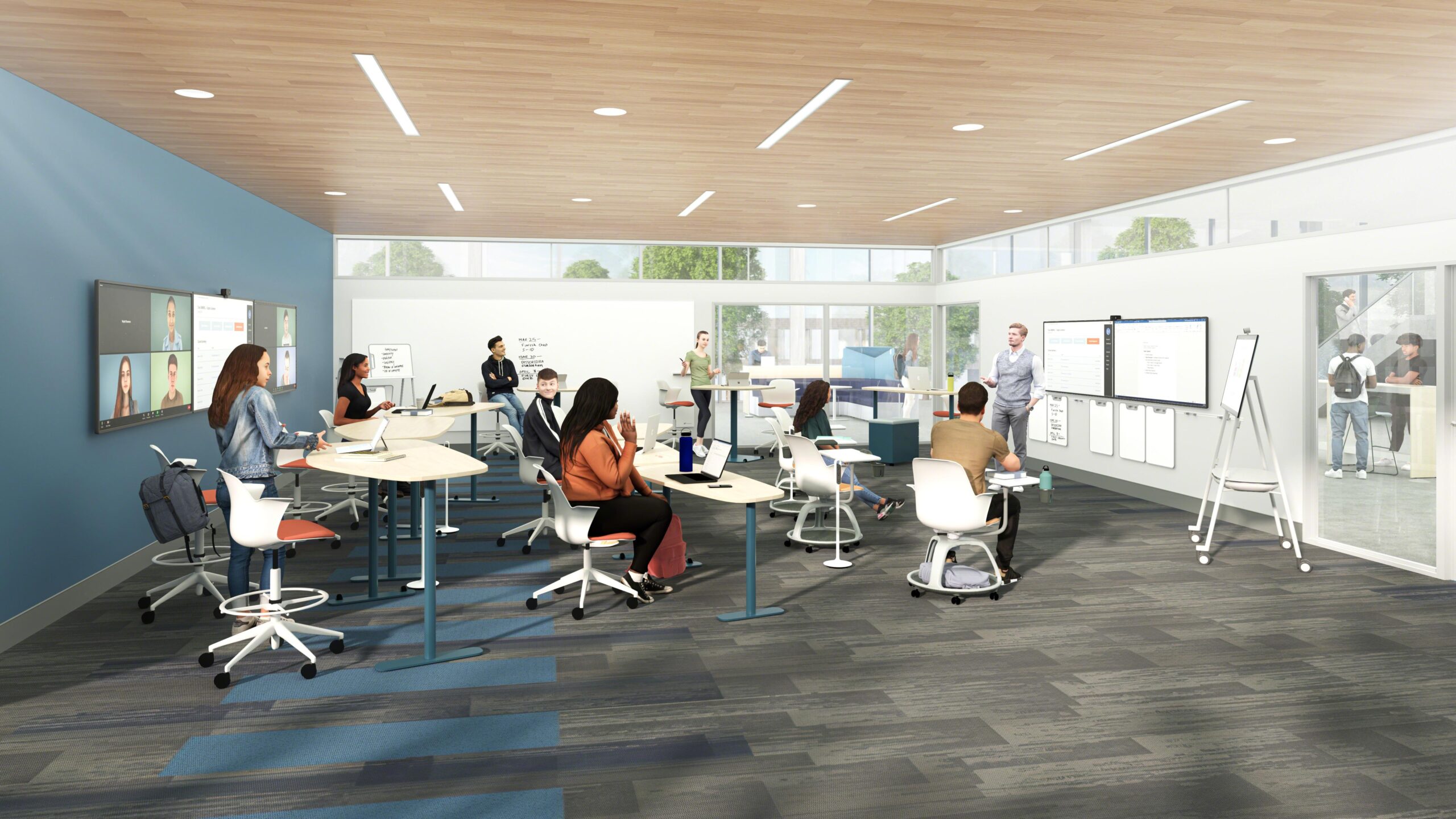
Hybrid Classrooms: Essential Design Tips for Flexible, Future-Ready Learning Spaces
As education continues to evolve rapidly in the digital age, the concept of hybrid classrooms has risen from flexibility and necessity to a strategic imperative. weather you’re a school administrator,educator,or facility designer,understanding how to create future-ready learning environments is crucial for supporting both in-person and remote learners seamlessly. This comprehensive guide explores the benefits of hybrid learning spaces, shares actionable design tips, and highlights real-world examples to help you build hybrid classrooms that are not only flexible but also engaging and technologically advanced.
The Rise of hybrid Classrooms
Hybrid classrooms combine the best elements of face-to-face and online learning. This blended approach supports active, personalized, and student-centered learning experiences. With advances in technology and the growing demand for learning anytime, anywhere, hybrid classrooms are essential in preparing students for the challenges of tomorrow’s world.
- Flexible learning options for diverse student needs
- Seamless integration of technology in education
- Support for collaboration, engagement, and adaptability
- Resilience against future disruptions
Key Benefits of Hybrid Classroom Design
Designing effective hybrid learning spaces offers a multitude of advantages:
- Inclusivity & Equity: Hybrid classrooms give all students access to resources and participation, regardless of physical location.
- Personalized Learning: Adaptive learning tools enable individualized instruction, catering to different needs and learning speeds.
- Collaboration & Engagement: Interactive spaces and digital platforms foster real-time collaboration, critical thinking, and problem-solving skills.
- Future Preparedness: Students and educators develop important digital literacy and self-management skills, crucial for the modern workforce.
- Flexibility: Spaces and curricula can quickly adapt to changing needs and technological advances.
Essential Design Tips for Hybrid Classrooms
To create a truly future-ready hybrid classroom, consider these vital design concepts:
1. Prioritize Flexible Furniture – Design for Movement
Enable quick transitions between group work, individual study, and whole-class sessions with modular, easily reconfigurable furniture.
- Choose mobile desks and chairs with wheels for smooth rearrangement.
- Opt for durable,lightweight tables that can be grouped or separated as needed.
- Add standing desks and collaborative zone seating to promote movement and engagement.
2. Integrate Advanced EdTech for Seamless Connectivity
Technology is the backbone of hybrid learning:
- Install high-definition cameras and microphone arrays to ensure remote students can see and hear everything clearly.
- Use interactive displays, smartboards, or large dual monitors for content visibility.
- Deploy reliable, high-speed Wi-Fi and invest in backup internet solutions to minimize disruptions.
- Leverage cloud-based collaboration tools for assignments, group work, and resource sharing.
3. Provide Intuitive Zones for Learning Variety
Hybrid classroom design should support diverse instructional modes:
- collaboration Corners: For brainstorming, teamwork, and digital co-creation.
- Focus Pods: Acoustic pods or nooks for individual concentration and online participation.
- Presentation Areas: Clear lines of sight and flexible seating for teacher demonstrations and student-led discussions.
4. Harness Acoustics and Lighting for Engagement
environmental comfort boosts attention and reduces learning fatigue:
- Ensure good acoustic design (sound-absorbing panels, minimal echo, noise-reducing layouts).
- Adopt flexible lighting systems that simulate natural daylight and can be adapted for online video quality.
5. prioritize Accessibility & Inclusivity
Hybrid classrooms must comply with universal design standards:
- Install ADA-compliant desks and access routes.
- Provide assistive technologies (captioning, screen readers, amplification) for students with disabilities.
- Ensure digital resources are optimized for accessibility.
6. Invest in Teacher Training & Support
Blended learning environments require new teaching skills:
- Offer regular professional development on edtech integration, classroom management, and hybrid pedagogy.
- Designate on-site or virtual “tech mentors” to assist educators with troubleshooting and lesson planning.
case Studies: Hybrid Classrooms in Action
Several leading institutions provide inspiring examples of hybrid classroom conversion:
- Stanford University: Their “Active Learning Classrooms” offer mobile whiteboards, ceiling microphones, and rapid reconfiguration to accommodate lecture, discussion, or group work—seamlessly supporting in-person and remote participants.
- Edina Public Schools (minnesota): Redesigned learning spaces feature high-tech screens, movable furniture, and digital collaboration hubs. Surveys showed improved student engagement and teacher satisfaction post-implementation.
First-Hand Experience: What Educators Say
“The hybrid classroom has allowed me to reach students who might otherwise be left behind—whether they’re home sick or unable to attend in person. The biggest game-changer? Flexible furniture and reliable tech. It keeps everyone involved and breaks down barriers to learning.”
— Maria S., High School science Teacher
Best Practices & Practical Tips for Designing Hybrid Classrooms
- Conduct a needs assessment for students, teachers, and infrastructure before making changes.
- Pilot small classroom redesigns, gather feedback, and scale up best innovations.
- Standardize technology platforms across classes to reduce confusion and improve support.
- Monitor air quality, temperature, and comfort to support wellness and sustained focus.
- Encourage student voice in classroom layout and technology feature decisions.
WordPress Styling Tip For Hybrid Classroom Articles
Use .wp-block-columns and .wp-block-image classes for visually engaging layouts,and highlight important points using .has-background and .has-text-color styles for accessibility.
Future-Proofing: Trends in Hybrid Learning Space Design
- AI-powered learning analytics to monitor engagement and personalize instruction.
- Virtual reality (VR) and augmented reality (AR) for immersive, hands-on learning across locations.
- Sustainable materials and energy-smart tech to create green,healthy classrooms.
Conclusion: Building Flexible, Future-Ready Hybrid Classrooms
As the educational landscape continues to evolve, hybrid classroom design sits at the intersection of flexibility, technology, and pedagogical innovation.By prioritizing adaptive layouts, robust connectivity, and equitable access, schools can create learning environments that are truly prepared for the demands of the future. Investing in hybrid spaces isn’t just about surviving disruption—it’s about fostering engagement, personalization, and lifelong learning skills for every student.
Ready to transform your classrooms? Start with these essential design tips and create a future-ready, flexible space where every learner can succeed—anytime, anywhere.