
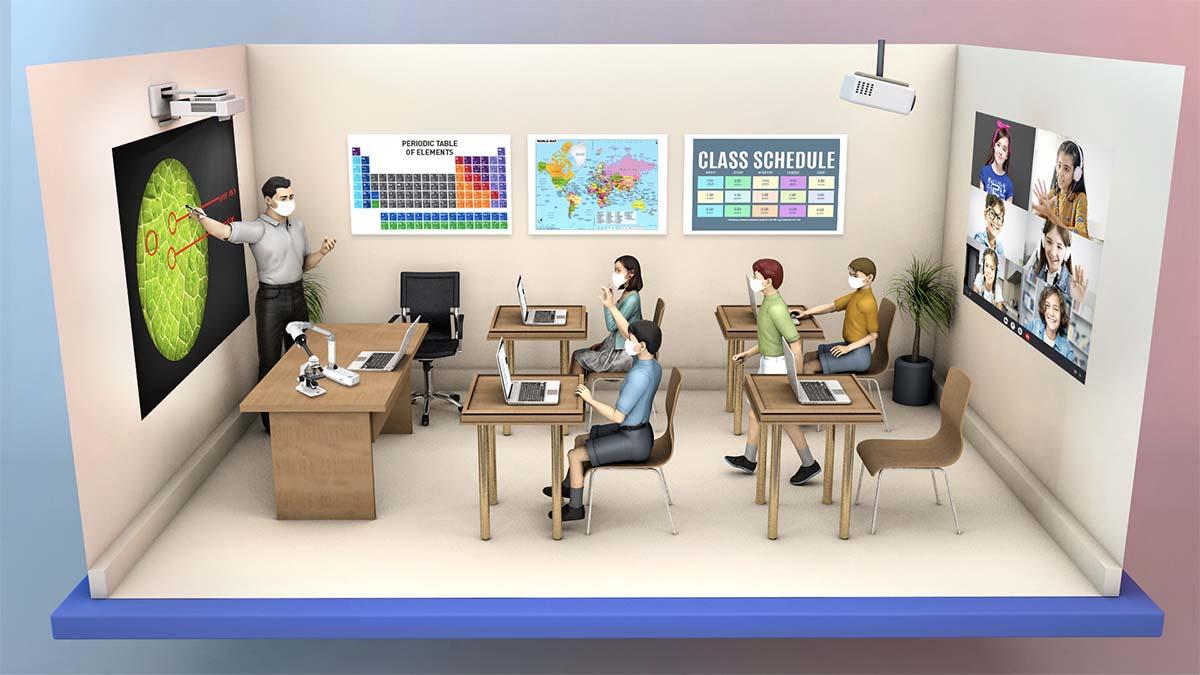
Hybrid Classrooms: Key Strategies for designing flexible Learning Spaces
As education continues to evolve in teh digital age, hybrid classrooms have emerged as a dynamic solution blending in-person and online learning. With the growing demand for adaptability,schools and institutions are reimagining customary settings to foster innovative flexible learning spaces that cater to diverse needs. In this thorough guide,we’ll explore essential strategies for designing hybrid classrooms,highlight the benefits,and share real-world examples and practical tips to inspire your own learning environment transformation.
What Are Hybrid classrooms?
Hybrid classrooms, sometimes called blended classrooms, seamlessly integrate face-to-face instruction with virtual teaching. This model allows students to participate from within the classroom or remotely, often concurrently. The concept brings together educational technology, flexible learning spaces, and pedagogical innovation, making learning more accessible, interactive, and adaptable.
The Benefits of Flexible Learning Spaces in Hybrid Classrooms
- Increased Accessibility: Students can engage regardless of location or circumstances.
- Improved Student Engagement: Interactive technology and varied seating arrangements support different learning styles.
- Enhanced Collaboration: Hybrid setups foster real-time collaboration between in-person and remote participants.
- Future-Proof Learning: Flexible learning spaces can quickly adapt to technological and pedagogical changes.
- Personalized Learning Experiences: Customizable classroom layouts accommodate small groups, self-reliant study, or whole-class instruction.
Key Strategies for Designing Flexible Hybrid Learning Spaces
To maximize the impact of hybrid classrooms, designing the right space is critical. Here are crucial strategies to consider:
1. Incorporate Modular, Multi-Functional Furniture
- Invest in light, movable desks and chairs to quickly reconfigure the room for group work, presentations, or silent study.
- Use mobile whiteboards and partitions to define break-out spaces or collaborative zones.
2. Integrate Cutting-Edge Educational Technology
- High-quality audio-visual equipment: Install cameras, microphones, and speakers so remote students interact equally with in-person peers and teachers.
- Interactive displays: Touchscreens and digital whiteboards help simulate in-class activity for all students.
- Reliable connectivity: Fast, stable Wi-Fi is non-negotiable for seamless hybrid learning experiences.
3.Prioritize Flexibility and Scalability
- Ensure spaces can expand or contract for varying class sizes or teaching styles.
- Design with plug-and-play technology for rapid adoption of new tools.
4. Foster Accessibility and Inclusivity
- Provide ample power outlets and device-charging stations.
- Use adjustable furniture to accommodate diverse needs.
- Promote equity by ensuring both remote and in-person students have access to resources and participation tools.
5. Create Zones for Different Learning Activities
- Designate spaces for quiet study, group collaboration, presentations, and teacher-led instruction.
- Utilize flexible partitions or furniture arrangements to switch between layouts quickly.
6. Embrace Green and Natural Elements
- Incorporate natural lighting where possible and add plants for a welcoming, calming environment.
- Introduce lasting materials to enhance air quality and student well-being.
7. Facilitate Seamless Integration of Physical and digital Worlds
- Ensure every student can see screens, hear speakers, and contribute to class discussions—regardless of location.
- Use learning management systems (LMS) to centralize assignments, feedback, and resources.
Practical Tips for Implementing Hybrid Flexible Classrooms
- Start with Stakeholder Input: gather feedback from teachers, students, and IT staff on needs and preferences.
- Pilot and Iterate: Launch a prototype hybrid classroom and adjust the approach based on real-world use.
- Train Staff: Provide comprehensive training on hybrid teaching technology and flexible classroom management.
- Communicate Expectations: Set clear protocols for how and when students participate, submit work, and communicate.
- Monitor and assess: Collect regular feedback and analyze outcomes to continually refine the hybrid model.
Case Studies: Prosperous Flexible Hybrid Classroom Designs
Case Study 1: University of Washington’s Collaboration Spaces
The University of Washington redesigned several classrooms into modular,tech-enhanced hubs. Furniture on wheels allows for spontaneous rearrangement. Panoramic cameras and ceiling mics ensure remote students join group work seamlessly. Results: Increased student satisfaction and notable improvements in group assignments.
Case Study 2: K-12 Innovation at Austin ISD
Austin Independent School District implemented flexible learning spaces by removing rows of desks and installing pod seating, writable walls, and mobile tech carts. Interactive displays and iPads facilitate both synchronous and asynchronous participation, making lessons more dynamic.
First-Hand Insights: Instructor and Student Perspectives
Teachers often report that hybrid classrooms require new skills—facilitating discussions that include all participants, managing technology, and maintaining engagement. Yet, many find the rewards considerable:
“The ability to reach every student, wherever they are, has been transformative. Our flexible learning space adapts to whatever the lesson demands—every day feels fresh and collaborative.”
— Linda S., High School Science Teacher
Students also appreciate the flexibility and inclusivity offered by modern hybrid classrooms.For some, the ability to choose how they participate leads to greater comfort, reduced stress, and improved academic performance.
Common Challenges and How to Overcome Them
- Technology hiccups: Invest in robust IT support and provide rapid troubleshooting resources.
- Teacher workload: Leverage co-teaching models and offer extra planning time for hybrid lesson advancement.
- Student equity: Lend out devices and Wi-Fi hotspots, and design lessons that don’t disadvantage remote learners.
conclusion: Embracing the Future of Learning
Hybrid classrooms and flexible learning spaces are no longer innovations—they’re essentials in modern education. By blending thoughtful design, powerful technology, and student-centered approaches, you can create inclusive, engaging environments that adapt to any challenge. Remember, successful hybrid learning thrives on flexibility, collaboration, and continuous evolution. As you reimagine your own classrooms, these key strategies and real-world insights will help you shape the future of learning, one space at a time.