
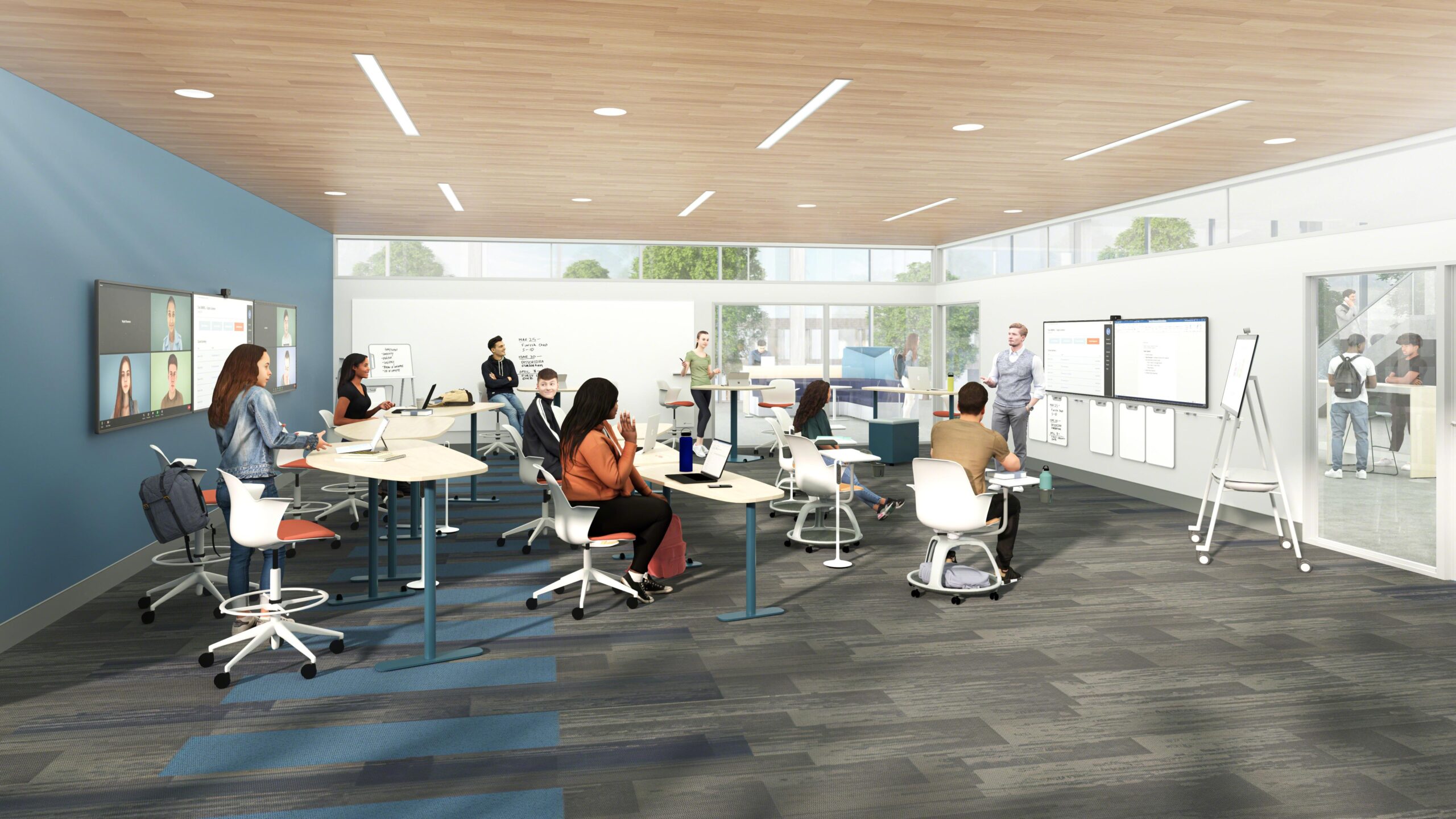
Hybrid Classrooms: Top Strategies for Designing Flexible and Future-Ready Learning Spaces
In the rapidly evolving world of education, hybrid classrooms have emerged as a leading solution to meet the diverse needs of today’s learners and educators. Designing flexible and future-ready learning spaces is crucial for schools and institutions aiming to foster engagement,inclusivity,and adaptability.This comprehensive guide explores the benefits, best practices, and actionable strategies for creating hybrid classrooms that stand the test of time.
What are Hybrid Classrooms?
Hybrid classrooms blend customary in-person teaching with online learning modalities, offering students the adaptability to attend lessons physically or remotely. This model leverages technology,flexible furniture,and innovative pedagogy to foster seamless collaboration,accessibility,and personalization in education. By embracing both synchronous and asynchronous learning,hybrid classrooms break down barriers and create more inclusive environments.
Benefits of Hybrid Classrooms
- Flexibility: Students can choose between in-person and remote participation,accommodating different learning styles and schedules.
- Enhanced Engagement: Varied instructional methods, including interactive digital tools, help keep learners actively involved.
- Scalability: Hybrid classrooms support larger groups and distributed learners, making it easier to adapt to changing needs.
- Resilience: schools can continue teaching uninterrupted during emergencies or disruptions, such as illness outbreaks or natural disasters.
- Accessibility: Technology ensures students with physical, geographical, or time constraints can still access high-quality education.
- Collaboration & Inclusion: Real-time and recorded lessons promote collaboration among diverse groups, including those with different abilities or backgrounds.
Top Strategies for Designing Flexible and Future-Ready Learning Spaces
To create an effective hybrid classroom, it’s essential to focus on both physical and digital aspects of the learning space. Below are actionable strategies to ensure your hybrid classrooms are both flexible and ready for the future:
1. Leverage Flexible Furniture and Layouts
- Modular Desks and Tables: Use lightweight, movable furniture that can be reconfigured for group work, lectures, or individual study.
- Mobile whiteboards and Displays: Facilitate dynamic instruction and brainstorming, catering to multi-use purposes.
- Flexible Seating: Include options such as standing desks, beanbags, or ergonomic chairs to accommodate various student preferences.
- Clear Sightlines: Ensure all students—both in-person and remote—can see the educator and digital displays clearly.
2. Invest in Robust Technology Infrastructure
- High-Speed Wi-Fi: Guarantee reliable connectivity for video conferencing, streaming, and online collaboration tools.
- Interactive Displays: Use smartboards and large screens to sync physical and virtual presentations, making lessons immersive.
- Audio-Visual Integration: Microphones, speakers, and high-quality cameras ensure remote learners can see and hear clearly. Consider ceiling-mounted microphones for full-room audio capture.
- Charging Stations: Provide accessible charging points for laptops, tablets, and other digital devices.
3. Choose the Right Digital Platforms and Tools
- Learning Management Systems (LMS): Platforms like Google Classroom, Canvas, or Moodle streamline course materials, assignments, and feedback.
- Video Conferencing Software: Zoom, Microsoft Teams, or Google Meet enable real-time interaction between remote and in-class learners.
- Collaborative Apps: use tools like Padlet, jamboard, and Miro to encourage group brainstorming and project collaboration.
4. Prioritize Accessibility and Inclusivity
- Universal Design Principles: Incorporate ADA-compliant furniture, gapped pathways, and wheelchair accessibility.
- Assistive Technology: Provide closed captions, screen readers, and alternative input devices as needed.
- Differentiated Instruction: Use digital tools to adapt learning materials to various abilities, languages, and preferences.
5. Promote Collaboration and Active Learning
- Breakout Spaces: Create zones for small-group work,quiet study,and hands-on activities.
- Interactive Polling & Quizzes: Platforms like Kahoot! and Mentimeter boost engagement through real-time feedback.
- Hybrid Group Projects: Design activities that require input from both remote and on-site students.
6. Support Teachers and Staff with Professional Growth
- Ongoing Training: Provide courses on new technology,digital pedagogy,and classroom management in a hybrid environment.
- Collaborative Planning: encourage teachers to share best practices and co-develop hybrid lesson plans.
- Technical Support: Ensure prompt assistance for any technology issues that might arise.
Practical Tips for Transitioning to Hybrid Classrooms
Based on experiences from schools and universities worldwide,here are some practical tips to streamline your hybrid classroom change:
- Pilot Before Scale: Start with one or two hybrid classrooms to identify challenges and adjust strategies before full-scale implementation.
- Solicit Feedback: Regularly ask students and teachers about their experiences to fine-tune technology and layouts.
- Communicate Clearly: Establish clear protocols for remote attendance, participation, and assignment submissions.
- Balance Synchronous and Asynchronous Learning: Blend real-time lessons with recorded content and self-paced activities for maximum flexibility.
- Prioritize Wellbeing: Set guidelines to prevent screen fatigue and support mental health for both students and staff.
Case Study: Hybrid Classroom Success in Action
At Lakeside High School, administrators invested in redesigning three classrooms with advanced cameras, interactive displays, and flexible seating. Teachers received digital pedagogy training and used Google Classroom to manage assignments. Within three months,92% of students reported improved engagement,and the school saw a significant drop in absenteeism. Teachers also noted easier communication and collaboration among all learners, both remote and in-person.
First-Hand Experience: Insights from an Educator
“Transitioning to a hybrid classroom felt overwhelming at first, but the flexibility has truly transformed my teaching. Students who struggled to attend regularly can now join remotely. Interactive polls and shared digital whiteboards have increased participation. My advice? Test your tech before each class and be open to feedback—students often have great ideas to improve the learning experience!”
Frequently asked questions about Hybrid Classroom Design
- How do I keep remote and in-person students equally engaged?
Use active learning strategies, breakout rooms, and interactive tools to ensure every student participates. Explicitly address both groups during lessons to foster inclusion.
- What budget-friendly technology should I prioritize?
Start with good cameras, microphones, and reliable internet. Free LMS platforms and collaborative apps can also make a big difference without breaking the bank.
- How can I measure the effectiveness of my hybrid classroom?
Gather regular feedback, track participation rates, and analyze student performance data to identify areas for betterment.
Conclusion: Building the Classrooms of Tomorrow, Today
Hybrid classrooms are more than just a response to current challenges—they represent a foundational shift toward a more flexible, inclusive, and future-ready education system. By embracing innovative strategies for classroom design, technology integration, and teaching methods, educators and administrators can empower students to thrive irrespective of location or circumstance. Start small, adapt as you learn, and invest in both your physical space and your people. The classroom of the future is here—make it work for everyone.