
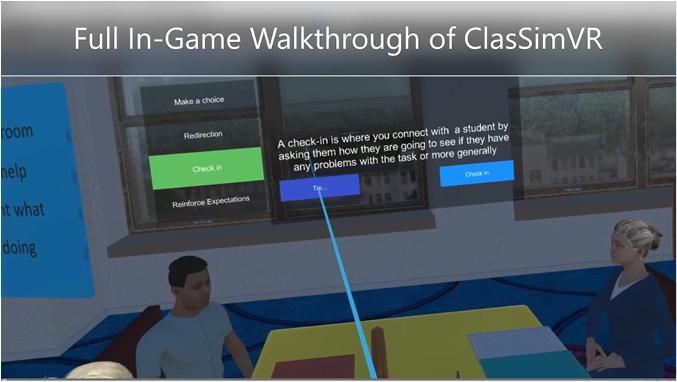
Mastering Virtual Classrooms: essential Strategies for Training Teachers to Use VR/AR tools Effectively
In today’s fast-evolving digital education landscape, teachers must adapt to a variety of new technologies to create engaging online learning experiences. Among the most transformative are Virtual reality (VR) and Augmented Reality (AR) tools,which are rapidly becoming key components of modern classrooms. This thorough guide will equip you with essential strategies for training educators to master virtual classrooms and leverage VR/AR tools effectively, unlocking new possibilities in immersive learning.
Why Virtual Classrooms Need VR/AR Integration
Virtual classrooms are redefining the way students learn and teachers teach. Integrating VR and AR tools enhances interactivity, boosts motivation, and personalizes the educational journey. VR/AR can:
- Take students on virtual field trips to past sites or remote planets.
- Enable immersive science experiments and 3D visualization.
- Facilitate practice of complex skills, such as surgical procedures or language conversations.
- Increase learners’ engagement and retention rates.
As educational institutions invest in virtual classroom technology, the demand for skilled teachers who can handle AR and VR solutions is growing. This makes comprehensive training an absolute necessity.
Benefits of VR/AR Tools in Online Teaching
- Enhanced Engagement: immersive experiences grab students’ attention and keep them motivated.
- Personalized Learning: Teachers can adapt content to various learning styles.
- Safe Experimentation: Students can practice procedures or explore environments without risk.
- Global Collaboration: Learners from anywhere in the world can share virtual spaces.
- Improved Accessibility: VR/AR can provide alternative ways for students with disabilities to access knowledge.
Essential Strategies for Training Teachers to Use VR/AR Tools
1. Start with the Basics of VR/AR Technology
Before diving into advanced VR/AR applications, educators need to be familiarized with foundational concepts:
- Key terminology (e.g., head-mounted displays, augmented overlays, 360° video).
- The difference between VR (fully immersive environments) and AR (enhancements layered over real-world views).
- Hardware requirements and device setup.
- VR/AR safety and best practices for classroom management.
2. hands-on Training and Exploration
Adults learn best by doing. Design training sessions that allow educators to:
- Experiment with different VR/AR applications relevant to their subject areas.
- Test out lesson simulations as both instructors and students.
- Navigate common troubleshooting scenarios.
“Our teachers found it immensely helpful to experience the student side of VR lessons. Walking in their shoes developed empathy and shaped better instructional methods.”
— EdTech Coordinator, Montreal School District
3. curriculum Integration and Lesson Planning
Training must bridge the gap between technology and pedagogy. To ensure successful curriculum integration:
- Provide real-world lesson templates using VR/AR.
- Facilitate workshops where teachers adapt existing units or create new learning experiences.
- Encourage collaborative lesson planning among subject-specific teams.
4. Ongoing Support and Professional Learning Communities
Support is critical to sustaining teachers’ confidence in VR/AR instruction:
- Set up online forums or chat groups where teachers share challenges and tips.
- Appoint VR/AR mentors or ‘tech champions’ within departments.
- Schedule regular check-ins and refresher webinars as technology evolves.
5. Assessment Strategies for VR/AR Activities
In virtual classrooms, assessment needs to reflect experiential learning:
- Teach educators to design rubrics for interactive assignments and simulations.
- Incorporate formative assessment tools built into many VR/AR platforms.
- Emphasize feedback-rich environments to promote reflective learning.
6. Mindset, Accessibility, and Inclusion
Encourage a growth mindset and global design principles:
- Address varying comfort levels with technology through differentiated training.
- Integrate accessibility features like audio descriptions and tactile feedback in VR/AR materials.
- Promote culturally responsive content to support diverse learners.
Practical Tips for Effective VR/AR Teacher Training
- Begin Small: Introduce simple VR/AR apps before progressing to complex simulations.
- Promote Reflection: Include time for teachers to discuss what worked and what didn’t after trying new tools.
- Resource Sharing: Maintain a shared repository of VR/AR lesson ideas and troubleshooting guides.
- Measure Impact: Collect data on student engagement and performance improvements to validate training efficacy.
- Collaborate with Developers: Create feedback loops with VR/AR vendors to customize features for educational contexts.
Case Study: Successful VR/AR Integration in virtual classrooms
Case Study: Sunrise Middle School, California
- Challenge: Low student engagement in remote science classes.
- solution: After three workshop series on VR environments, teachers integrated interactive labs and 3D cellular animations.
- Results: Within six months, attendance in virtual classes rose by 27%, and science comprehension rates improved by 34% as measured by standard assessments.
“I never imagined that our students would be so enthusiastic to attend online biology lessons.VR made concepts come alive in ways textbooks never could.”
— Lead Science Teacher, sunrise Middle School
Expert Insights: First-Hand Experience in VR/AR teacher Training
Laura T.,Digital Learning specialist:
“Initially,some colleagues were apprehensive about the time investment needed to master VR/AR tools. But after structured, peer-supported workshops and having tech ambassadors on-call, adoption grew rapidly. The key is a supportive culture and plenty of hands-on practice.”
Teachers universally agree that purposeful support and incremental exposure empower them to leverage VR/AR technology confidently, ultimately benefiting their students.
Overcoming Common Challenges in VR/AR Teacher Training
- technical Issues: Offer troubleshooting sessions and rapid-reference guides.
- Time Constraints: Build training into existing PD (Professional Development) days.
- Budget Limitations: Start with cost-effective VR/AR apps and leverage open-source resources.
- Resistance to Change: Showcase success stories and peer-led demonstrations to build buy-in.
Conclusion: Shaping the Future of Virtual Classrooms with Confident Teachers
Successfully mastering virtual classrooms and VR/AR tools empowers teachers to transform passive online lessons into immersive, interactive, and impactful experiences.Comprehensive training—rooted in practical strategies, ongoing support, and a culture of collaboration—is crucial for educators to fully harness the benefits of VR/AR in digital learning spaces.
By investing in meaningful professional development for VR/AR technology, schools and educational institutions ensure that their teachers are not just users, but true innovators in virtual education. This positions both educators and students for future-ready success, redefining what’s possible in the 21st-century classroom.
Ready to take your virtual classroom to the next level? Start by investing in effective VR/AR teacher training today, and watch your educational outcomes soar.