
Unlocking the Future: How to Train Teachers to Use VR/AR Tools Effectively in the Classroom
Virtual and augmented reality (VR/AR) technologies are rapidly transforming the educational landscape, bringing immersive experiences and interactive learning straight into classrooms. But as innovative as VR/AR tools are, their true potential can only be unlocked when teachers are well-equipped to use them confidently and effectively. This article explores actionable strategies for training teachers to integrate VR and AR in their lessons, details the benefits, and provides practical insights for successful implementation.
Why Training Teachers for VR/AR Integration Matters
While VR and AR tools offer powerful opportunities for transforming education,educators often face barriers such as unfamiliar technology,lack of confidence,and insufficient support. Effective training is vital to bridge this gap, ensuring teachers not only understand VR/AR hardware and software but also feel empowered to incorporate them into productive, student-centered learning experiences.
Benefits of VR/AR in the Classroom
- Enhanced Engagement: VR/AR creates immersive, interactive environments, increasing student participation and enthusiasm for learning.
- Improved Retention: Students remember information better through experiential learning,visualizations,and hands-on activities.
- Accessible Learning: Virtual field trips and simulations make complex or distant concepts accessible to all students, regardless of background.
- STEM and STEAM Enrichment: VR and AR foster skills in science, technology, engineering, arts, and mathematics through gamified exploration and problem-solving.
- Personalized Education: Adaptive VR/AR applications can tailor content to individual learning needs and styles.
Challenges Teachers Face When Adopting VR/AR Tools
- Technical Proficiency: Many educators are unfamiliar with VR/AR devices, operating systems, and content creation tools.
- Curriculum Integration: Difficulty aligning VR/AR lessons with educational standards and learning objectives.
- Resource Limitations: Schools may face constraints in hardware, software, bandwidth, or funding.
- Time Constraints: Teachers already have packed schedules and may lack time for additional training or lesson development.
How to Train Teachers to Use VR/AR Tools Effectively
1.Start with a Needs Assessment
Understand your educators’ current skill levels, technical backgrounds, and openness to new technologies. A simple survey or focus group can identify specific VR/AR training needs. this ensures training programs are relevant, targeted, and efficient.
2. Provide Hands-On, Experiential Training
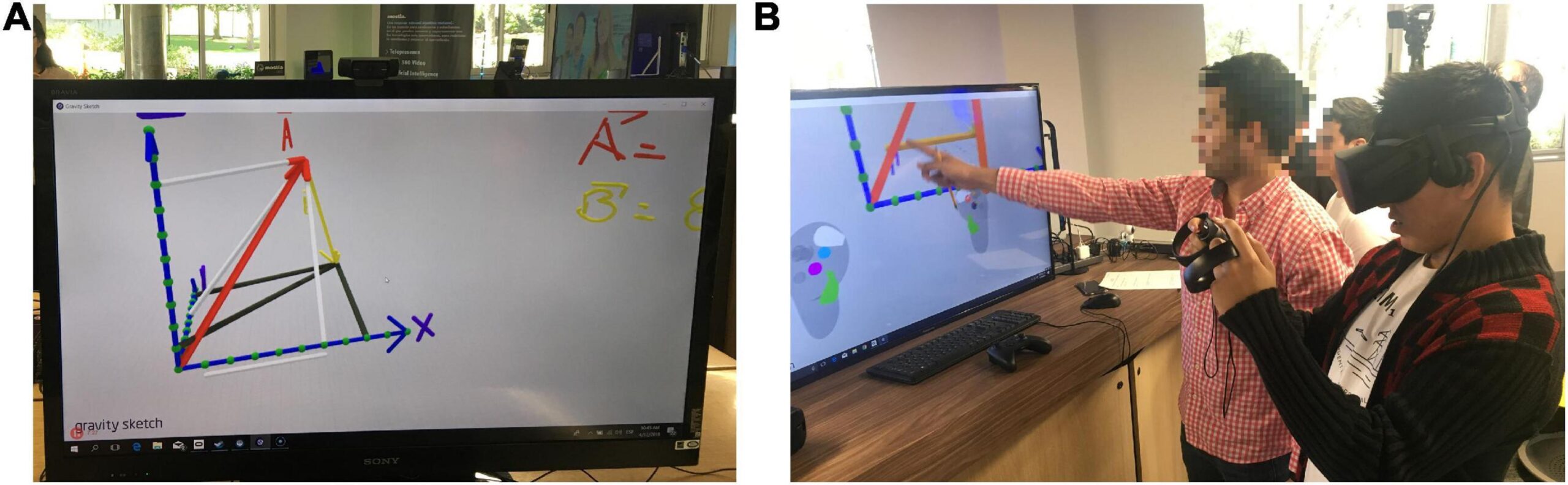
- Interactive Workshops: Run in-person or virtual workshops where teachers use VR headsets and AR apps in practise sessions.
- Sandbox Environments: Let educators experiment without fear of “breaking” anything, increasing confidence and curiosity.
- Peer Demonstrations: Early adopters can showcase successful VR/AR lessons to their colleagues.
3. Align VR/AR Training with Curriculum Goals
Show teachers how VR/AR tools support existing curricula, learning outcomes, and state or national standards. Provide sample lesson plans, subject-specific applications, and classroom management tips for immersive learning.
4. Offer Ongoing Support and Just-in-Time Learning
- Helpdesks and Tech Coaches: Designate technology mentors or coaches as go-to contacts for troubleshooting and pedagogical advice.
- Online Resources: Create a digital libary of video tutorials, step-by-step guides, and forums for sharing best practices.
- Professional Learning Communities: Encourage teachers to join networks and social media groups focused on VR/AR in education.
5. foster a Growth Mindset and Collaborative Culture
Adopting new technology can be daunting. Encourage risk-taking and celebrate small successes. Promote team teaching, collaborative lesson planning, and peer observations to share insights and reduce anxiety.
6. Address Equity and Accessibility
- Ensure all teachers have equal access to devices and training regardless of technical background or school resources.
- Highlight inclusive design principles, such as voice commands or haptic feedback, for students with disabilities.
7. Measure Impact and Continually Refine Training
Collect feedback from teachers about their experiences, successes, and challenges.Use data to adapt training content, frequency, and delivery methods for continuous improvement.
Practical Tips for Teacher Training in VR/AR
- Start small with basic VR/AR activities (e.g.,360-degree photos,simple AR apps) before introducing advanced simulations or custom content creation.
- Integrate VR/AR into existing units rather than as a standalone “tech day.”
- Coordinate with IT staff to resolve technical issues and schedule device maintenance.
- Highlight free and low-cost VR/AR resources suited for K-12 or higher education (e.g., Google Expeditions, Merge EDU, CoSpaces Edu).
- Invite students to collaborate in lesson planning or demonstration activities — their digital intuition can support learning for all!
Case Study: VR/AR implementation Success story
Jefferson Middle School (Grade 7 Science)
- challenge: Teachers struggled to engage students with customary textbook-based lessons on the solar system.
- Action: The school district sponsored hands-on VR/AR workshops, provided VR headsets, and grouped teachers by subject area for lesson planning.
- Outcome: Within one semester, teachers reported a 30% increase in student engagement and higher quiz scores on the solar system unit. Students explored planets up close, collaborated in digital “space missions,” and created AR content to explain astronomical phenomena.
Teacher feedback highlighted the importance of accessible guidance, peer support, and repeat practice in building proficiency and enthusiasm for VR/AR integration.
Firsthand Experience: A Teacher’s Outlook
“Initially, I was intimidated by the idea of teaching with VR. After attending a hands-on workshop and collaborating with colleagues, I realized that VR is just a tool—like a whiteboard or a laptop—but its potential to ignite curiosity is immense. My students remember our ‘virtual’ field trips far longer than anything we read in a textbook. The key is ongoing support and a safe space to experiment!”
— Emily R., 5th Grade Teacher
Recommended VR/AR Training Resources for Educators
- Eduspire — Online courses focused on integrating emerging technology in the classroom.
- #ARVRinEDU — Community and resource hub for educators using AR/VR in education.
- CoSpaces Edu — VR/AR platform for student storytelling and content creation, with teacher guides and lesson plans.
- MergeEDU — Hands-on AR science activities with educator resources and webinars.
- Common Sense Education — Curated VR/AR app reviews and classroom integration tips.
Conclusion: Empowering Teachers for Tomorrow’s Classrooms
Unlocking the full power of VR/AR in education starts by empowering teachers through thoughtful,ongoing training and support. When educators are equipped with the skills, confidence, and resources to use VR and AR tools, they can create truly immersive, memorable, and impactful learning experiences for their students. By investing in personalized, practical training and nurturing a culture of innovation, schools can prepare both teachers and students for the exciting future of education.